If you’ve been researching card vending machines for more than a week, you already know the internet is full of vague pricing and unrealistic profit promises. Let me cut through that noise: a new trading card vending machine will cost you anywhere from $6,500 to $18,000 depending on configuration, screen size, payment systems, and whether you buy from a domestic assembler or import directly from a manufacturer. That price range is for the hardware alone, and it doesn’t include shipping, taxes, location fees, or the inventory you’ll need to fill it. Over the past decade I’ve placed dozens of these units across malls, hobby shops, and even grocery stores, and I can tell you the initial sticker price is the smallest part of the real financial picture. The actual cost of running a profitable card vending operation is tied to where you put it, how fast you turn inventory, and whether you treat it like a retail business or just a fancy vending machine. This guide is based on what I’ve actually seen work, and what I’ve seen fail miserably.
What a Card Vending Machine Actually Is (and Isn’t)
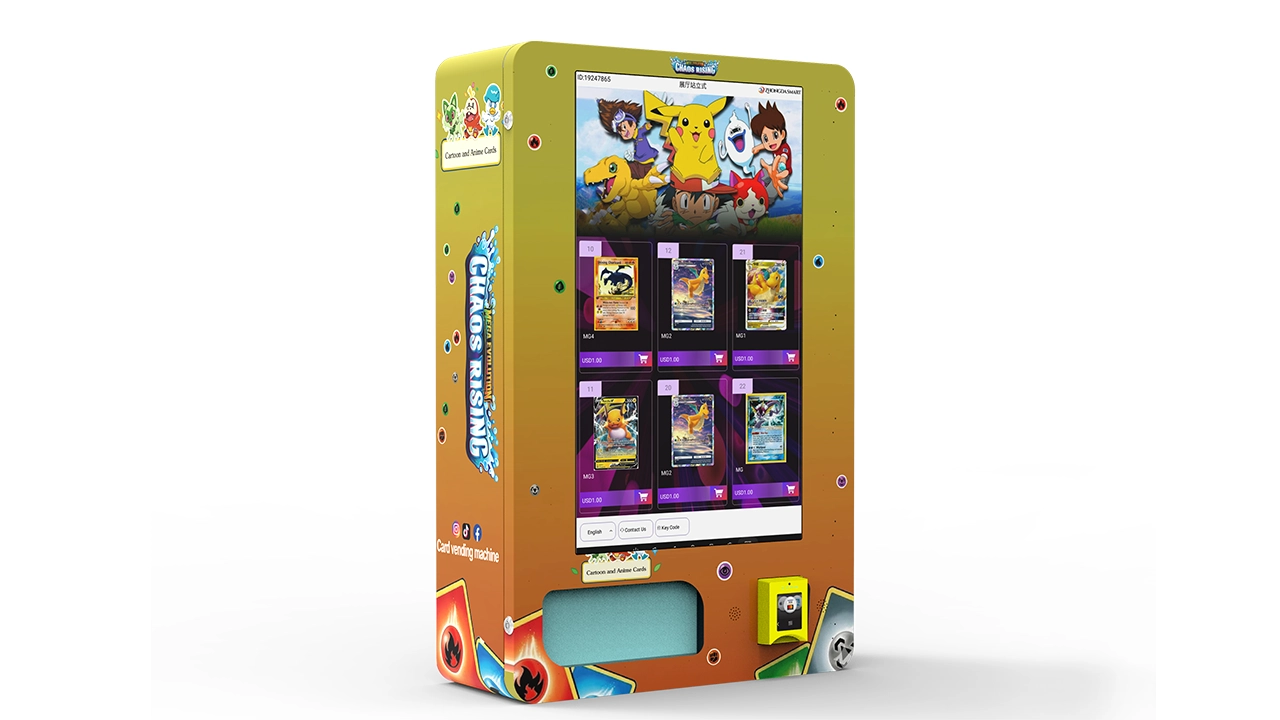
Before we talk numbers, let’s get one thing straight. A card vending machine is not a gumball machine with Pokémon packs inside. It’s a self-service kiosk built specifically for trading cards, sports cards, and collectible packs. Most units include angled shelves, LED lighting, a touchscreen or button interface, and a payment system that accepts cards, mobile wallets, and sometimes cash. The better ones have temperature control or at least humidity management, because cardboard warps and foil packs degrade in heat.
I’ve seen operators try to retrofit a snack machine to sell cards, and it’s a disaster. The shelves are wrong, the drop mechanism damages packs, and the machine looks out of place in a hobby shop. A dedicated card vending machine is built with the product in mind. That matters more than you think. Collectors are picky about condition, and a machine that bends a pack corner will get you bad reviews faster than a slow payment system.
There’s also a difference between a full-size machine and a wall-mounted or countertop unit. The smaller units are cheaper, but they hold less inventory and often don’t have the visual presence that draws customers in. I’ve placed both, and I’ll get into the tradeoffs later. For now, just understand that “card vending machine” covers a pretty wide range of hardware, and the price reflects that.
Breaking Down the Real Costs: Hardware, Shipping, Installation
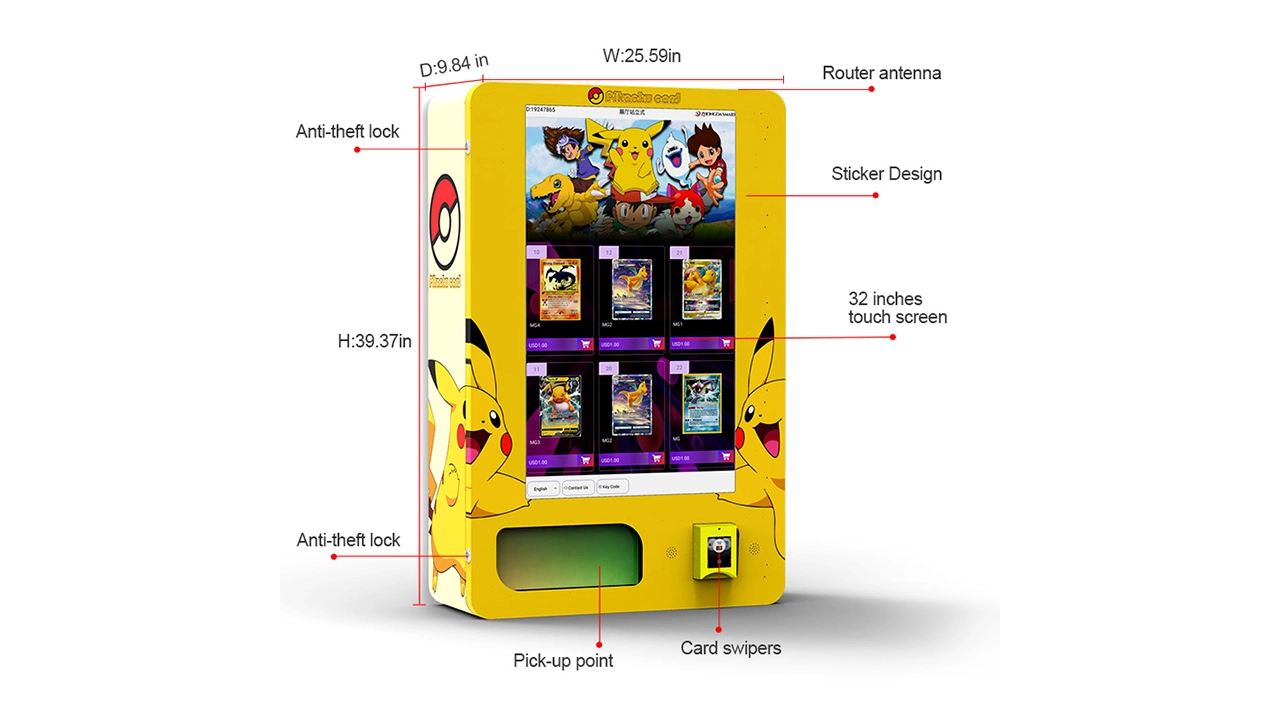
Let’s talk about the actual money. A basic 32-inch touchscreen card vending machine from a reputable Chinese manufacturer like Zhongda Smart will land around $6,500 to $9,000 FOB. That’s the unit itself, but it doesn’t include freight, which for a 400-pound machine from overseas runs $800 to $1,500 depending on port and final delivery. If you buy from a US-based reseller, you’ll pay a premium, usually $12,000 to $18,000, but you get local support and faster shipping. I’ve done both, and I can tell you the reseller markup is worth it if you’re not comfortable troubleshooting electronics on your own.
Then there’s installation. You’ll need a standard 110V outlet, and in some locations you’ll need to hire an electrician to run a dedicated circuit. That’s another $200 to $600. If you’re placing the machine in a mall or a store, you might also need to pay for a licensed contractor to bolt the machine to the floor, especially if there are children around. That’s $150 to $400 depending on your area.
Don’t forget the payment system. Most modern card vending machines come with a card reader built in, but you’ll need to set up a merchant account or use a payment aggregator like Stripe or Square. Transaction fees run 2.6% to 3.5% plus 10 cents per swipe. That’s an ongoing cost, not a one-time expense. If you’re running a high-volume location, those fees add up quickly.
Finally, there’s the inventory. This is the part most new operators underestimate. You can’t put $500 worth of cards in a $10,000 machine and expect to make money. You need depth. I typically stock a new location with $2,500 to $4,000 in product, and that’s just for the initial fill. You’ll need to replenish weekly or biweekly depending on sales velocity.
Real Numbers from My Own Operations
I’ve got a unit in a suburban hobby shop that does $1,800 to $2,400 a month in sales. The machine cost $8,200 delivered, I put $3,200 in inventory, and I pay the shop owner 15% of gross sales as a commission. My gross margin on cards is around 45% to 55% after wholesale costs, transaction fees, and the location commission. That means I’m netting roughly $800 to $1,200 a month from that one machine. The machine paid for itself in about nine months.
But I’ve also had a machine in a mall food court that did $400 in its first month. I moved it after six weeks. The problem wasn’t foot traffic—the mall had plenty. The problem was that people in a food court aren’t thinking about buying Pokémon packs. They’re thinking about lunch. That was a $9,000 lesson in location psychology.
Another operator I know put a machine in a laundromat because the rent was cheap. It did okay for a few months, then the card reader broke and he didn’t notice for three days because the machine was in a corner. He lost about $600 in sales and had to pay $250 for a service call. That’s the kind of thing that kills your profit if you’re not paying attention.
Location Is Everything: How to Evaluate a Spot
I’ve said it before and I’ll say it again: the machine is the same, but the location makes or breaks your business. A card vending machine in the right spot can gross $3,000 a month. In the wrong spot, it’ll gross $300. The difference isn’t the hardware. It’s the people walking by and whether they’re in the right mindset to buy.
Here’s what I look for when evaluating a potential location. First, I want to see the actual foot traffic, not the mall’s marketing numbers. I’ll sit in the location for an hour on a Saturday and count how many people walk past, and more importantly, how many look like they’d buy trading cards. That means kids with parents, young adults, hobbyists. A busy grocery store might have tons of foot traffic, but if 90% of those people are buying milk and eggs, they’re not your customer.
Second, I look at the surrounding businesses. A card vending machine does best near hobby shops, comic book stores, game stores, or even toy sections. I’ve seen a machine do surprisingly well outside a movie theater, because parents are looking for something to keep kids occupied. I’ve also seen a machine fail in a gym lobby. The crowd just isn’t there.
Third, I check the hours. If the location closes at 9 PM, you lose the evening crowd. Some of my best sales happen between 6 PM and 9 PM on weekdays. A 24-hour location like a Walmart or a truck stop can be great, but those spots often come with higher rent or stricter requirements for machine appearance and maintenance.
The Cost Comparison: New vs Used vs Leased
One question I get all the time is whether to buy new, buy used, or lease. There’s no single right answer, but I can give you my honest take based on what I’ve seen.
Buying new is the safest bet if you’re planning to run the machine for several years. You get a warranty, you know the history, and you can customize the configuration. The downside is the upfront cost. A new machine with all the bells and whistles will set you back $10,000 to $15,000 with shipping and installation.
Buying used is cheaper, usually $3,000 to $6,000, but you’re taking on risk. I’ve bought used machines that were perfectly fine and others that had failing screens and corroded card readers. Unless you’re comfortable with electronics repair, I’d avoid used unless the seller offers a warranty or you can test the machine thoroughly before paying.
Leasing is an option if you don’t have the capital, but the monthly payments will eat into your margins. A typical lease on a $10,000 machine runs $200 to $350 a month for 36 months. That’s $7,200 to $12,600 over the lease term, which is more than the machine costs new. I only recommend leasing if you’re testing a location and don’t want to commit capital.
| Option | Upfront Cost | Monthly Cost | Risk Level | Best For |
|---|---|---|---|---|
| New Machine | $8,000 – $15,000 | $0 (plus fees) | Low | Long-term operators |
| Used Machine | $3,000 – $6,000 | $0 (plus fees) | Medium-High | Tinkerers, budget operators |
| Leased Machine | $0 – $500 down | $200 – $350 | Medium | Testing new locations |
| Revenue Share | $0 | 20% – 40% of gross | Low | New operators, low capital |
My personal preference is to buy new for your first two machines. You learn the technology, you have a warranty when something goes wrong, and you can sell the machine later if you decide to exit. Used machines are fine once you know what you’re doing, but they’re not for beginners.
How Long Until You Break Even?
This is the question everyone wants answered, and the honest answer is: it depends. In my experience, a well-placed card vending machine pays for itself in 8 to 14 months. That assumes you’re grossing $1,500 to $2,500 a month, your gross margin is around 50%, and you’re not paying an outrageous location fee.
Let me give you a realistic example. Say you spend $10,000 on a machine and $3,000 on initial inventory. That’s $13,000 total. If you gross $2,000 a month and your cost of goods is $1,000, you’re making $1,000 in gross profit. Subtract transaction fees (about $70), location commission (maybe $300), and an allowance for maintenance (say $50), and you’re netting around $580 a month. That gives you a payback period of about 22 months on the full $13,000 investment. But if you only count the machine cost, since inventory is reusable, the payback is closer to 17 months.
Now, if you find a great location and gross $3,500 a month, your net profit jumps to around $1,200 a month, and you’re paid back in 11 months. The spread is wide, and that’s why location selection is so important. Don’t expect to get rich in three months. This is a steady, small business, not a lottery ticket.
Operating Costs You Can’t Ignore
Beyond the initial investment, there are ongoing costs that eat into your profit if you’re not careful. I’ve seen operators ignore these and then wonder why they’re not making money.
Electricity is one. A card vending machine with LED lighting and a touchscreen uses about 100 to 200 watts. That’s roughly $10 to $20 a month in electricity depending on your local rates. Not a big deal, but it adds up across multiple machines.
Maintenance is another. You should budget $50 to $150 a month per machine for repairs and servicing. The most common issues are card reader failures, screen glitches, and jammed dispensing mechanisms. If you’re handy, you can fix some of these yourself with spare parts. If not, you’ll pay a technician $100 to $200 per visit.
Software and connectivity costs are often overlooked. Many modern card vending machines require a cellular or Wi-Fi connection for remote monitoring and payment processing. That’s $20 to $40 a month per machine for a data plan. Some operators skip this to save money, but then they can’t see sales data in real time or troubleshoot remotely. I’ve learned the hard way that a machine without remote monitoring is a machine you’ll be driving to every time something goes wrong.
Inventory: The Hidden Profit Driver
Here’s where the real money is made or lost. Trading cards have a huge markup compared to snacks or drinks. A box of Pokémon cards that costs you $50 wholesale can sell for $80 to $100 retail. That’s a 60% to 100% markup. But the flip side is that some cards don’t sell at all. You’ll be stuck with slow-moving product that ties up your cash.
I’ve learned to mix high-demand items like new Pokémon sets and sports card blasters with higher-margin items like booster packs and sleeves. I also pay close attention to release dates. When a new set drops, sales spike for two to three weeks. If you’re not stocked up before a major release, you’re leaving money on the table.
One mistake I made early on was buying too much of a single product. I once bought 40 boxes of a sports card set that I thought would sell out quickly. It didn’t. I was stuck with $1,200 in inventory that took six months to move. Now I keep my inventory diversified and never put more than 20% of my budget into a single product line.
Choosing the Right Machine: Key Features to Pay For
Not all card vending machines are created equal. Here are the features I consider non-negotiable based on my experience.
First, the payment system. You need a card reader that accepts credit cards, debit cards, and mobile payments like Apple Pay and Google Pay. Cash is less important, but some locations still have customers who prefer cash. I’d recommend a machine that accepts both, even if you rarely use the cash option.
Second, the screen. A 32-inch touchscreen is the sweet spot for card vending machines. It’s big enough to display product images and prices clearly, but not so big that it drains power or becomes a maintenance headache. I’ve seen machines with larger screens, but they’re usually overkill and cost more to repair.
Third, the dispensing mechanism. Some machines use a spiral or coil system, others use a shelf-and-pusher system. For cards, I prefer the shelf-and-pusher because it’s gentler on the packaging. Spiral systems can crush boxes if the product isn’t the right size.
Fourth, remote management. You want a machine that connects to a cloud dashboard so you can check sales, inventory levels, and error codes from your phone. This is a game-changer for multi-location operators. If you’re only running one machine, it’s still worth the extra few hundred dollars for the peace of mind.
Vending Machine Repair: What Breaks and How to Handle It
Let’s talk about vending machine repair because it’s a reality you’ll face. The most common issues I’ve encountered are card reader failures, screen freezes, and jammed dispensing units. These are usually fixable on-site with basic tools, but sometimes you need a technician.
I remember one incident where a machine in a game store started giving out double product every time someone paid. That sounds like a great problem for the customer, but it was a nightmare for me. I lost about $80 in product before I noticed it in the remote dashboard. By the time I drove to the location and reset the machine, it had dispensed about 15 extra packs. That was a $120 mistake that could have been avoided if I’d checked the remote alerts more frequently.
My advice is to buy a machine with a reliable warranty and to keep a small stock of spare parts on hand. I keep an extra card reader, a power supply, and a few sensors in my trunk. That way, if something breaks, I can often fix it on the spot without waiting for a technician.
Supplier Selection: How I Vetted Manufacturers
When you’re looking to buy a card vending machine, the supplier matters as much as the machine itself. I’ve worked with a few different manufacturers over the years, and I’ve learned to ask specific questions before signing a purchase order.
First, ask about the warranty. A reputable manufacturer should offer at least a one-year warranty on parts and labor. Some, like Zhongda Smart, offer longer terms on certain components. If a supplier only offers a 90-day warranty, walk away.
Second, ask about spare parts availability. You want to know that you can buy a replacement screen or card reader in two years, not just in the first six months. Some manufacturers discontinue parts quickly, which leaves you stranded.
Third, ask about software updates. Card vending machines rely on payment software that needs to stay current with security standards. If the manufacturer doesn’t provide updates, your machine may become non-compliant with payment card industry (PCI) rules over time.
Finally, ask for references. A good supplier will connect you with other operators who use their machines. I’ve called these references and asked about reliability, customer support, and hidden costs. That’s how I avoided a couple of bad deals.
Self-Service Kiosk vs Traditional Vending: Why Cards Are Different
There’s a reason card vending machines are often called self-service kiosks rather than vending machines. They operate on a different model. A traditional snack vending machine sells low-margin, high-turnover items. A card kiosk sells higher-margin, lower-turnover items. That changes everything about how you manage the business.
For one, you can’t just refill a card machine once a month. The inventory needs to be rotated, and you need to track which products are selling and which are sitting. I check my sales data weekly and adjust my assortment based on what’s moving. If a particular set isn’t selling after two weeks, I discount it or move it to a different location.
Another difference is the customer experience. People who buy cards from a vending machine are often collectors. They want to see the product clearly and feel confident about the condition. That means the machine needs to be clean, well-lit, and organized. A dirty or disorganized machine will turn off your best customers.
Revenue Share vs. Fixed Rent: Which Is Better?
When you place a machine in someone else’s business, you’ll usually be offered either a fixed monthly rent or a revenue share. I’ve done both, and here’s my honest take.
Fixed rent is predictable. You know exactly what you’re paying each month, and you can calculate your break-even point precisely. But it’s riskier because if the location underperforms, you’re still on the hook for the rent.
Revenue share is more flexible. You pay a percentage of your gross sales, usually 15% to 30%. This aligns your interests with the host location, but it can be more expensive if you do well. I’ve seen locations ask for 30% of gross, which is too high. I usually negotiate for 15% to 20%.
My rule of thumb is to start with a revenue share for a new, unproven location. Once the location proves itself over three to six months, I might negotiate a fixed rent if it’s lower than my average revenue share payment.
Regulations and Permits: What You Need to Know
Depending on where you live, you may need a business license, a sales tax permit, and possibly a vending machine permit. In the US, most states require you to collect sales tax on vending machine sales. That means you need to register with your state’s department of revenue and file returns, usually monthly or quarterly.
Some cities and counties also require a specific vending machine license. The cost is usually $50 to $200 per machine per year. I’ve seen operators skip this and get fined, so don’t ignore it. If you’re placing a machine in a mall or a grocery store, the property manager may also require you to provide proof of insurance. A general liability policy for a single machine runs about $300 to $500 a year.
In the European Union, the rules are different. You’ll need to comply with VAT registration, and some countries have specific requirements for automated retail equipment. If you’re operating in France, you might see the term distributeur automatique used for vending machines, and you’ll need to check local commercial codes. I’ve seen US operators assume their home state rules apply everywhere, and that’s a costly mistake.
Common Mistakes New Operators Make
I’ve been in this business long enough to see a lot of people jump in and fail. Here are the most common mistakes I’ve witnessed.
The first is buying too much machine for the location. A $15,000 machine with a huge screen and fancy lighting doesn’t make sense in a small hobby shop. You’re better off with a mid-range machine and more inventory.
The second mistake is underpricing or overpricing. Some operators think they can sell cards at retail prices and make a killing. But if your price is higher than what customers can find online, they’ll just look it up on their phone and leave. I price my cards at or slightly below the typical retail price, and I make my money on volume and margin.
The third mistake is ignoring the data. If you’re not tracking sales by product, you’re flying blind. I’ve seen operators keep stocking slow-moving items because they liked the product themselves. That’s not a business strategy; it’s a hobby.
Scaling Up: When and How to Add More Machines
Once you have one machine running profitably, it’s tempting to expand quickly. I’d advise against it. I’ve seen operators go from one machine to five in a month and then struggle to manage them all. The key to scaling is having a system in place for restocking, maintenance, and data tracking.
I usually wait until a machine has been profitable for at least three consecutive months before I consider adding another. I also make sure I have the time to visit each machine at least once a week. If I can’t, I either hire someone or slow down the expansion.
Another consideration is financing. If you’re buying multiple machines, you might qualify for equipment financing. Interest rates vary, but you can often get a loan with a 10% to 20% down payment. Just make sure the monthly payments don’t eat into your operating budget.
My Final Take on the Business
Card vending machines are not a get-rich-quick scheme, but they can be a solid small business if you treat them with respect. The upfront cost of a card vending machine is real, and so are the ongoing expenses. But with the right location, the right inventory, and a commitment to staying on top of maintenance, you can build a steady income stream that pays you back within a year or so.
I’ve made mistakes, lost money on bad locations, and spent more than I planned on repairs. But I’ve also built a network of machines that generate reliable monthly income. If you’re willing to learn, adapt, and put in the work, this can be a rewarding business. Just don’t believe anyone who tells you it’s easy.
Disclaimer: The figures and experiences shared here are based on my personal operations and should not be taken as a guarantee of financial performance. Costs, sales, and payback periods vary significantly based on location, market conditions, and operational decisions. Always conduct your own research and consult with a financial advisor before making a significant investment.
Frequently Asked Questions
Are card vending machines profitable?
Yes, they can be profitable if placed in the right location with the right product mix. In my experience, a well-run machine can net $500 to $1,500 per month after all costs. However, many machines fail because of poor location selection or lack of maintenance. Profitability depends heavily on foot traffic, product selection, and your ability to manage inventory efficiently.
How much does a card vending machine cost?
A new card vending machine typically costs between $6,500 and $18,000, depending on the configuration, screen size, and payment systems. Used machines can be found for $3,000 to $6,000, but they carry more risk. You should also budget for shipping, installation, and initial inventory, which can add another $3,000 to $5,000 to your startup costs.
How long does it take to break even on a card vending machine?
Based on my operations, a well-placed machine pays for itself in 8 to 14 months. This assumes gross sales of $1,500 to $2,500 per month and a gross margin around 50%. If your location underperforms, the payback period can stretch to two years or more, which is why location selection is so critical.
Should I buy or lease a card vending machine as a beginner?
I generally recommend buying a new machine for your first unit. Leasing may seem easier, but the monthly payments will eat into your profits, and you won’t own any equity. Buying a used machine is possible if you’re comfortable with repairs, but it’s riskier. If you’re not sure about the business, consider a revenue share arrangement with a host location to minimize upfront costs.
Where is the best place to put a card vending machine?
The best locations are hobby shops, comic book stores, game stores, and areas near toy sections in larger retailers. You want foot traffic from people who are already interested in collectibles. Avoid locations where the crowd is not aligned with your product, like gyms or food courts, unless you have a specific reason to believe otherwise.
What permits and licenses do I need for a card vending machine?
In the US, you’ll typically need a business license, a sales tax permit, and possibly a vending machine license depending on your city or state. You may also need general liability insurance. In the EU, you’ll need to comply with VAT rules and local commercial regulations. Check with your local government before installing a machine.
How do I choose a supplier for a card vending machine?
Look for a supplier with a solid warranty, available spare parts, and ongoing software support. Ask for references and talk to other operators about their experiences. I’ve had good results with Zhongda Smart, but you should always do your own due diligence. Avoid suppliers that only offer a 90-day warranty or don’t provide remote management software.
What should I do if my card vending machine breaks down?
Start by checking the remote dashboard for error codes. Many issues can be resolved with a simple reset. If that doesn’t work, you’ll need to visit the machine or call a technician. Keep spare parts on hand, like card readers and sensors, to minimize downtime. Regular maintenance can prevent many common issues.
How can I reduce restocking and maintenance costs?
Use a remote management system to track inventory levels and sales data in real time. This allows you to restock only when necessary and identify slow-moving products quickly. Schedule routine maintenance every few months to catch small issues before they become big ones. Diversify your inventory to avoid being stuck with unsold product.