If you’re looking into the trading card vending machine business, the first question you probably want answered is whether these machines actually make money in a 24/7 retail setting. After a decade of operating vending routes across the US and Europe, I can tell you this: the best trading card vending machine features aren’t just about flashy screens or card dispensers—they’re about reliability, payment flexibility, and inventory control that lets you sleep while the machine sells. I’ve placed machines in game stores, mall corridors, and even laundromats, and the difference between a profitable unit and a money pit almost always comes down to the features you choose before you sign the purchase order. In this guide, I’ll break down what actually matters, what doesn’t, and where I’ve seen operators lose their shirts.
Why Trading Card Vending Machines Are a Different Beast
Running a snack or soda machine teaches you one thing: people buy out of habit. A trading card vending machine is completely different. You’re selling collectibles, nostalgia, and the thrill of a rare pull. That changes everything about how you stock, price, and place the unit. I’ve had weeks where a single Pokémon booster box outsold every snack item in a convenience store combined. But I’ve also watched operators fail because they treated cards like candy bars.
The key difference is demand volatility. Card demand spikes with new set releases, influencer trends, and local tournament schedules. A machine that does $400 on a Friday night might do $40 on a Tuesday morning. That’s not a bug—it’s the nature of the product. You need a machine that can handle these swings without jamming, and you need software that tells you what’s selling before you waste a trip restocking the wrong items.
Another difference is theft and tampering. Cards are small, high-value, and easy to steal if the machine isn’t designed properly. I’ve seen operators lose thousands to simple fishing tricks—someone sliding a wire through the dispenser slot. The best machines have anti-fishing mechanisms, secure locking doors, and internal cameras. If a vendor tries to sell you a unit without these, walk away.
Core Features That Separate Profitable Machines from Expensive Paperweights
Let me walk you through the features I insist on after years of trial and error. Some of these I learned the hard way, like the time I bought a cheap machine that looked great on paper but failed within three weeks.
Dispensing Mechanism Reliability
The heart of any card vending machine is the dispensing system. Cards are packaged in boxes, blisters, and loose packs, and they don’t all behave the same way. A good machine should handle multiple package sizes without constant adjustment. My rule of thumb: if you have to recalibrate the auger or spiral more than once a week, the machine is costing you money.
I once ran a unit that jammed every time a customer bought a loose pack. The fix required a technician visit that cost more than the profit on the sale. That’s when I switched to machines with servo-driven dispensing arms instead of gravity-based chutes. They’re more expensive upfront, but they cut jams by 90% in my experience.
Look for machines that allow quick changeovers between product types. You don’t want to spend an hour adjusting shelves every time a new card set drops. Some of the newer models have tool-less adjustability, which is worth the extra cost if you plan to rotate inventory frequently.
Payment Systems That Actually Work
Cashless payment is non-negotiable in 2025. I’d say 80% of my sales come from cards, Apple Pay, or Google Wallet. If your machine only takes coins and bills, you’re leaving money on the table—especially with younger buyers who never carry cash.
But not all card readers are equal. I’ve tested cheap readers that fail to connect in areas with weak cellular signals. The best trading card vending machine features include a redundant payment system: both a card reader and a QR code scanner that works offline. You also want a reader that accepts contactless payments without forcing the customer to insert a chip—speed matters when someone is deciding whether to buy one pack or three.
One thing I learned the hard way: make sure the payment system supports dynamic currency conversion for international tourists. In tourist-heavy spots, this can increase sales by 15% because buyers don’t have to do mental math. It sounds minor, but it adds up.
Inventory Tracking and Remote Monitoring
If you’re running more than one machine, you need remote monitoring. The days of driving to a location just to see if something sold are over. The best machines connect to a cloud dashboard that shows real-time inventory, sales history, and error codes.
I’ve saved thousands by using a machine that sends me a text alert when a specific SKU is low. For example, when I see that a particular booster box is down to two units, I can decide whether to restock or let it sell out and replace it with a newer product. This kind of data-driven decision is what separates profitable operators from hobbyists.
Remote monitoring also helps with security. If the machine is opened at 3 AM when the store is closed, you get an alert. I’ve caught two attempted thefts this way, and both times the police arrived before the culprits got away with anything valuable.
Security Features That Prevent Theft and Vandalism
Card vending machines are targets. The product is small, valuable, and easy to resell. I’ve seen machines in low-traffic areas get broken into within a week of installation. The best machines have reinforced steel doors, tamper-proof locks, and internal motion sensors that trigger an alarm.
One feature that often gets overlooked is the dispenser chute design. If the chute is too deep, someone can stick their hand in and grab product that hasn’t fully dropped. If it’s too shallow, cards can be fished out with a wire. The sweet spot is a chute with a flap that only opens when the product is dispensed. This is one of those trading card vending machine details that you don’t think about until you lose a week’s worth of profit.
I also recommend installing a camera that points at the machine from a distance, not just inside the unit. This gives you footage of the person’s face, not just their hands. Some locations have their own cameras, but you can’t always rely on them.
Location, Location, Location: Where to Place Your Machine
I’ve placed machines in over 40 locations, and I’ve learned that the best machine in the world won’t save a bad location. You need foot traffic, but more importantly, you need the right kind of foot traffic. A machine in a busy grocery store might get plenty of looks, but if the shoppers aren’t card collectors, you’ll be lucky to sell $50 a week.
My best locations have been dedicated card shops, hobby stores, and comic book shops. These places already have a built-in audience. The owners are happy to host a machine because it generates revenue without taking up staff time. I typically split revenue with the host—usually 70/30 in my favor—but the exact split depends on the foot traffic and the store’s existing card sales.
Malls and entertainment venues can work too, but you need to be selective. I had a machine in a mall that did great during the holiday season but died in January. The rent was fixed, so my margins took a hit. If you’re considering a mall, negotiate a seasonal lease or a revenue-share agreement rather than a flat monthly fee.
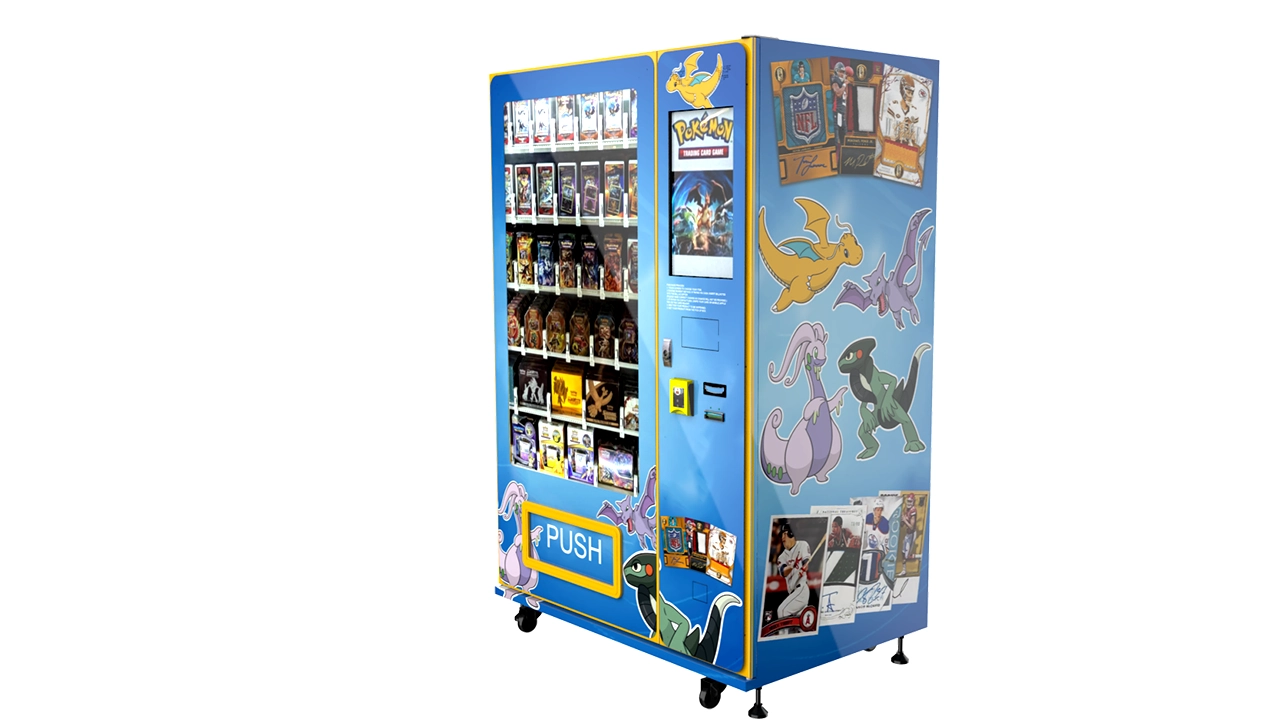
Another surprising location: laundromats. I know it sounds odd, but laundromats have a captive audience with time to kill. Parents bring kids, and kids see a card machine and beg for a pack. I’ve had laundromat machines do $300 a week with zero marketing. The downside is that these locations often have poor lighting and no security, so you need a machine with a bright screen and solid locks.
The Cost Breakdown: What You’ll Actually Spend
Let’s talk numbers. The initial investment for a trading card vending machine varies wildly depending on the features, size, and whether you buy new or used. I’ve seen basic wall-mounted units for $3,000 and fully-loaded 32-inch touchscreen machines for $15,000 or more.
Here’s a realistic breakdown based on my experience and industry data:
| Machine Type | Initial Cost (USD) | Monthly Revenue Potential | Payback Period |
|---|---|---|---|
| Basic wall-mounted unit | $3,000 – $6,000 | $200 – $600 | 6 – 18 months |
| Freestanding standard model | $6,000 – $10,000 | $500 – $1,500 | 8 – 14 months |
| High-end touchscreen model | $10,000 – $15,000+ | $800 – $2,500 | 10 – 18 months |
These are rough estimates from my own routes and conversations with other operators. Your actual numbers will depend on location, product mix, and how often you restock. A machine in a prime card shop might do $2,000 a month, while the same machine in a quiet office building might struggle to hit $200.
Don’t forget the hidden costs: shipping, installation, payment processing fees (usually 2.5% to 3.5% per transaction), and maintenance. I budget about 10% of monthly revenue for maintenance and repairs. That covers everything from jammed dispensers to screen replacements.
Real Data on Market Growth
According to a report by Statista, the global trading card games market was valued at around $12 billion in 2023 and is projected to grow at a compound annual growth rate of about 8% through 2030. This growth is driven by nostalgia, new IPs, and the rise of live-streamed pack openings. For vending machine operators, this means a growing customer base that’s already comfortable with self-service retail.
Another useful data point comes from IBISWorld, which shows that the broader vending machine operators industry in the US generates over $7 billion annually. The industry has been shifting toward specialized machines—like those for cards, electronics, and health products—as traditional snack vending stagnates.
One more thing to consider: the US Small Business Administration (SBA) provides resources for small business owners, including vending machine operators. They have loan programs that can help with the initial investment, though you’ll need a solid business plan. I’ve used SBA-backed loans for two of my machines, and the process was straightforward once I had my numbers in order.
Supplier Screening: How to Avoid Getting Burned
I’ve bought machines from three different suppliers, and only one of them earned my repeat business. The first machine I bought was from a company that promised “high-end features” but delivered a unit that jammed constantly and had terrible customer support. I lost $2,000 in the first month just on technician visits.
When you’re evaluating suppliers, ask for references from operators who’ve had the machine for at least a year. A supplier who can’t provide references is a red flag. Also, check whether the supplier offers spare parts and technical support in your region. If you’re in the US, you don’t want to ship a machine back to China for repairs.
One supplier that has consistently impressed me is Zhongda Smart. They’re a Chinese manufacturer that has expanded into the card vending niche, and their machines have held up well in my routes. I’m not saying they’re perfect for everyone—their lead times can be long, and shipping costs are significant—but their build quality is solid, and their software is more reliable than what I’ve seen from cheaper competitors. I’d recommend them for operators who want a feature-rich machine without paying premium Western-brand prices.
When comparing quotes, don’t just look at the base price. Factor in shipping, customs, installation, and the cost of any accessories like payment readers or cameras. A $5,000 machine might end up costing $7,000 by the time it’s installed and running. I’ve seen operators underestimate these costs and blow their entire budget before the machine made a single sale.
Real-World Failure and Success Stories
I’m not going to pretend every machine I’ve placed has been a winner. My biggest failure was a unit I put in a tourist gift shop near a hotel. The foot traffic was high, but the audience was wrong. Tourists wanted magnets and keychains, not $10 booster packs. The machine sat there for three months, selling maybe $30 a week. I finally moved it to a card shop and it started doing $500 a week within a month. The lesson: demographics matter more than raw foot traffic.
On the flip side, my best success was a machine I placed in a small comic book store that had been struggling to sell cards because the owner didn’t have time to manage inventory. I offered a revenue-share deal where I handled all stocking and maintenance. The owner was skeptical at first, but after six months, the machine was generating more revenue than the store’s entire card section had before. That machine paid for itself in nine months.
Another success story: I partnered with a local game store to run a 24/7 self-service kiosk outside their building. The store closed at 9 PM, but the machine kept selling until midnight. This tapped into the after-hours crowd—people who wanted cards but couldn’t make it during business hours. The machine did an extra $300 a week that the store would have missed otherwise.
Maintenance and Restocking: The Daily Grind
Owning a card vending machine isn’t passive income. You’ll need to restock at least once a week, sometimes more often if the machine is in a high-traffic location. My average is every 5 to 7 days, but I’ve had machines that needed restocking every 3 days during a hot new set release.
Restocking is about more than just refilling. You need to rotate inventory, remove damaged products, and check that the machine’s internal temperature and humidity are within range. Cards can warp if stored in a hot environment, and that ruins the product and your reputation.
Maintenance is the less glamorous side. I budget $50 to $100 per month per machine for consumables and minor repairs. That includes things like new dispensing arms, screen protectors, and cleaning supplies. Major repairs—like replacing a compressor or a main control board—can cost $300 to $500, so you want a machine with a good warranty.
One tip I’ve learned: keep a small inventory of spare parts on hand. I keep an extra dispensing motor, a card reader, and a power supply for each machine model I own. This has saved me weeks of downtime. Waiting for a part to ship can take 10 days, and that’s 10 days of lost revenue.
Comparing Business Models: Buy, Lease, or Revenue Share
There are three main ways to get into this business, and each has its pros and cons. I’ve done all three, and I’ll give you my honest take.
| Model | Upfront Cost | Monthly Cost | Control | Profit Potential |
|---|---|---|---|---|
| Buy outright | $3,000 – $15,000 | None | Full | Highest (after payback) |
| Lease | $0 – $1,000 deposit | $150 – $400/month | Limited | Lower (lease eats into margin) |
| Revenue share | $0 | None | Shared | Variable (depends on split) |
Buying outright is the best long-term play if you have capital. You own the asset, and after the payback period, most of the revenue is profit. The downside is the risk: if the machine fails or the location goes bad, you’re stuck with an expensive paperweight.
Leasing is a good option for beginners who want to test the waters without a big upfront commitment. But lease payments add up. A $300 monthly lease on a machine that does $600 in revenue leaves you with only $300 before product costs. That’s not a great deal unless the lease includes maintenance and support.
Revenue share is my favorite for entering new locations. The host gets a cut, so they’re motivated to promote the machine. The downside is that you have less control over placement and marketing. If the host doesn’t care about the machine, sales will suffer.
Common Mistakes I See New Operators Make
I’ve mentored a few operators who reached out after reading my blog, and the same mistakes keep coming up. Let me save you the trouble.
First, they buy the cheapest machine they can find. I get it—everyone wants to minimize risk. But cheap machines break, and every breakdown costs you revenue and reputation. A $3,000 machine that jams twice a week is more expensive than a $6,000 machine that runs flawlessly for a year.
Second, they overstock. I’ve seen operators fill a machine with $2,000 worth of cards, only to realize that 40% of that inventory sits unsold for months. Cards have a shelf life—new sets replace old ones, and prices drop. You’re better off stocking less and restocking more frequently.
Third, they ignore the location’s hours. If you place a machine in a store that closes at 6 PM, you’re missing the evening crowd. The whole point of a 24/7 machine is to sell when the store is closed. Look for locations where the machine can be accessed 24/7, whether that’s an outdoor kiosk or a lobby that stays open.
Fourth, they don’t track their data. If you’re not using the machine’s software to see which products sell and which don’t, you’re flying blind. I check my sales dashboard every morning. It takes five minutes, and it tells me exactly what to restock and what to discount.
The Role of Touchscreens and Interactive Features
One of the more exciting developments in this niche is the rise of touchscreen machines. These aren’t just vending machines—they’re interactive kiosks that can display product images, show pull rates, and even play videos of pack openings. I’ve seen these machines outsell traditional ones by 30% to 50% in the same location.
Why? Because they create engagement. A customer who can see what’s inside a pack—even if it’s just a visual representation—is more likely to buy. And the touchscreen allows for dynamic pricing. I can run a promotion on a slow day, or increase the price of a hot product in real time.
But touchscreens come with a cost. They’re more expensive to buy and repair. A cracked screen can cost $400 to replace. And they require more electricity, which can be a consideration in locations where you pay for power. Still, if you’re placing a machine in a high-traffic area, the extra cost is usually worth it.
I’ve written more about the specific features of 32-inch touchscreen trading card vending machines if you’re interested in the technical specs. The short version: bigger screens and faster processors make a difference in customer experience, but they also increase the initial investment.
Regulations and Permits: What You Need to Know
Operating a vending machine isn’t as simple as buying a machine and finding a spot. You need to comply with local regulations, which vary by state and country. In the US, most states require a seller’s permit and a sales tax registration. Some cities have specific vending machine licenses, and a few require a background check.
In the EU, the rules are stricter. You’ll need to comply with GDPR if you collect any customer data, and you’ll need to meet CE marking requirements for electrical safety. I’ve seen operators get fined for not having the right certifications, so it’s worth doing your homework.
If you’re in the US, I recommend checking the SBA’s guide to federal and state tax IDs. This will walk you through the basics of getting your business registered. You’ll also want to check with your local city clerk’s office for specific vending machine regulations.
One thing I’ve learned: don’t rely on the location owner to handle permits. It’s your machine, your business, and your responsibility. I’ve had hosts promise they’d handle it, only to find out months later that I was operating illegally. Get your own permits and keep copies on file.
How to Choose Between New and Used Machines
Used machines can be tempting because they’re cheaper. I’ve bought a couple of used units, and the results were mixed. One was a steal—a barely-used machine from an operator who was going out of business. The other was a nightmare—a machine that looked fine on the outside but had a corroded motherboard that failed within a month.
If you’re considering a used machine, ask for maintenance records and test it thoroughly before handing over money. Run a full cycle with actual card products, not just a test coin. Check the payment system with both cash and card. And inspect the dispensing mechanism for wear and tear.
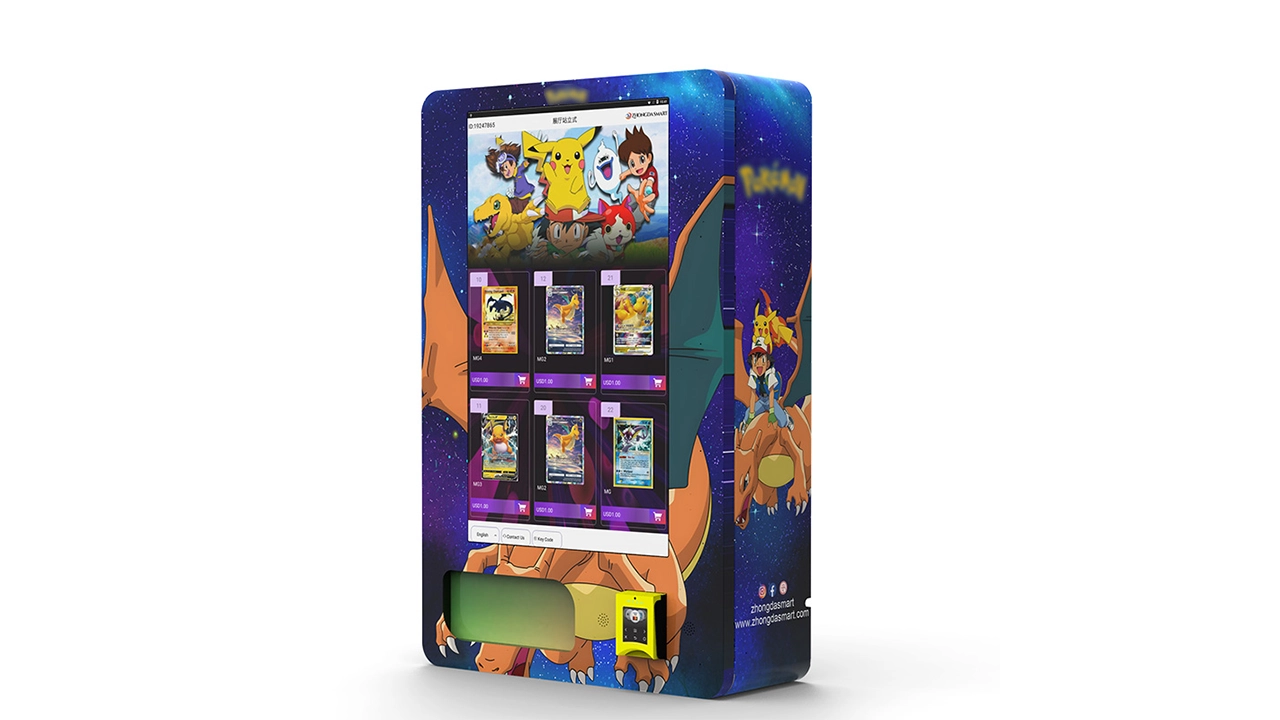
My rule of thumb: don’t buy a used machine unless it’s at least 40% cheaper than a new equivalent, and even then, only if the seller can prove it’s been well-maintained. The risk of downtime is just too high.
If you’re looking for a wall-mounted option to save space, I’ve seen some solid wall-mounted card vending machines that work well in tight spaces like store entrances. They don’t have the capacity of a freestanding unit, but they’re cheaper and easier to place.
FAQ: Answers to the Questions I Get Most Often
Do trading card vending machines actually make money?
Yes, but not automatically. In the right location with the right product mix, a machine can generate $500 to $2,500 per month. But you need to account for product costs, location fees, and maintenance. My experience is that a well-placed machine has a net profit margin of 25% to 40% after all expenses. That’s solid, but it’s not “get rich quick.”
How much does a trading card vending machine cost?
A basic wall-mounted unit starts around $3,000, while a high-end touchscreen model can cost $15,000 or more. Add shipping, installation, and initial inventory, and you’re looking at a total investment of $5,000 to $20,000 for your first machine.
How long does it take to recoup the investment?
Based on my routes, the typical payback period is 8 to 18 months. It depends on location, product pricing, and how often the machine sells. A machine in a busy card shop might pay back in 6 months, while a machine in a low-traffic spot could take 2 years.
Should beginners buy or lease a machine?
If you have the capital, buying is better in the long run. Leasing reduces upfront risk but eats into your margins. I’d recommend buying a mid-range machine for your first unit, and only if you have at least one solid location lined up.
Where should I place my machine for the best results?
Card shops, comic book stores, hobby shops, and entertainment venues are your best bets. Look for places with existing card-buying customers and foot traffic. Avoid locations where the audience is too broad or the demographic doesn’t match card collectors.
What permits and licenses do I need?
You’ll need a seller’s permit and sales tax registration in most US states. Some cities require a specific vending machine license. In the EU, you’ll need CE certification and GDPR compliance if you collect data. Check with your local government for specific requirements.
How do I choose a reliable supplier?
Ask for references, check reviews, and verify that the supplier offers spare parts and technical support in your region. Look for manufacturers with a track record in the vending industry. I’ve had a good experience with Zhongda Smart, but you should do your own due diligence.
What should I do if my machine breaks down?
Start with the machine’s built-in diagnostic tools. Many issues can be resolved remotely by restarting the system or clearing a jam. If it’s a hardware failure, you’ll need a technician. Keep a list of local repair services that specialize in vending machines, and always have spare parts on hand.
How can I reduce maintenance and restocking costs?
Choose a reliable machine with high-quality components, track your inventory data to avoid overstocking, and negotiate location fees based on actual performance. Regular cleaning and preventative maintenance also reduce costly breakdowns.
Final Thoughts from the Trenches
I’ve been in this business long enough to see trends come and go. Trading card vending machines aren’t a fad—they’re a natural fit for the collectibles market, which is growing steadily. But success isn’t guaranteed. It takes careful planning, a good location, and a willingness to learn from mistakes.
If you’re serious about this, start small. Buy one machine, place it in a location you know has card-buying customers, and track your numbers for three months. That data will tell you everything you need to know about whether to expand. And don’t be afraid to move a machine if it’s not performing—I’ve moved machines that went from $100 a week to $500 a week just by changing locations.
One last piece of advice: keep learning. The card market changes, technology improves, and customer preferences shift. The operators who stay flexible and adapt are the ones who build sustainable businesses. If you want to dig deeper into specific models and configurations, I’ve put together some resources on specific machine models and placement strategies that might help. Good luck, and may your machines never jam.
Disclaimer: The figures and insights in this article are based on my personal experience and publicly available data. Actual results vary by location, market conditions, and operational efficiency. Always conduct your own research and consult with a financial advisor before making significant investments.