If you are looking at a trading card vending machine as a business, the first question you need to answer isn’t about location or inventory—it’s about how people are going to pay. I have spent over a decade placing automated retail equipment across the United States and Europe, and I can tell you that the payment system will make or break your machine faster than any other component. A machine that only takes coins or a single card type will struggle to hit the volume you need to cover rent and restocking. In my experience, a trading card vending machine needs to support contactless debit and credit cards, mobile wallets like Apple Pay and Google Pay, and a reliable cash option for younger buyers who still walk around with bills. Getting this right from day one determines whether you are running a passive income asset or a repair headache.
Why Payment Flexibility Is Non-Negotiable in Card Vending
The demographics of card buyers are unique. You are not selling soda to office workers; you are selling to kids, teenagers, and young adults who grew up with smartphones but also still receive physical allowance money. If your machine only accepts cards, you exclude a large chunk of the after-school crowd. If you only accept cash, you lose the convenience that drives impulse purchases. The payment systems you choose directly influence your daily transaction count, and that number is the single most important metric in this business.
I have seen operators install expensive machines with top-tier screens and lighting, only to pair them with a clunky card reader that takes thirty seconds to process a transaction. In the vending world, thirty seconds is an eternity. A buyer will walk away, and they will not come back. The payment experience needs to be as fast as the product display is attractive. This is especially true for a trading card vending machine, where the product is small, the price point is low, and the purchase is often impulsive.
The Non-Negotiable Payment Methods
Let me break down what you actually need, based on real operational data from my own routes. First, you need a modern NFC-enabled reader that accepts tap-to-pay credit and debit cards. This is the baseline for any adult buyer. Second, you need mobile wallet support—Apple Pay and Google Pay are not optional anymore; they are the default way most people under forty pay for small items. Third, you need a cash acceptor and dispenser. This sounds old-school, but in my experience, cash still represents twenty to thirty percent of transactions at locations near schools or community centers.
I learned this lesson the hard way. I placed a machine at a local game store that catered heavily to younger players. I had installed a card-only system to save on the cost of a cash module. Within two weeks, the store owner was calling me to say that kids were pressing the screen and walking away frustrated. I lost an entire month of potential revenue before I swapped in a unit with a bill acceptor and coin slot. That mistake cost me roughly four hundred dollars in lost sales and an extra service call. The lesson stuck: you build the machine for the customer, not for your accounting convenience.
Cash vs. Cashless: The Real-World Balance
The debate about cash versus cashless in automated retail is tired, but the answer depends heavily on your location profile. In a high-traffic mall or a tourist-heavy area, cashless might cover ninety percent of your sales. In a suburban strip mall next to a middle school, cash could be forty percent. You need to build your payment setup based on where the machine sits, not on what is trendy.
I currently run a 32-inch touchscreen trading card vending machine at a family entertainment center. That unit does about seventy percent card and mobile wallet, twenty percent cash, and ten percent other methods like store credit. If I had gone cashless-only, I would have lost a significant chunk of sales from kids who come in with birthday money. The cash module adds a bit of maintenance work, but the revenue it protects is well worth the occasional jam.
Another factor to consider is the cost of processing fees. Card transactions eat into your margin. For a low-ticket item like a booster pack, a two or three percent processing fee might not sound like much, but it adds up across hundreds of transactions. Some operators price their products slightly higher to absorb this, but that can make you less competitive. I recommend running a hybrid approach: accept everything, but track your payment mix monthly to see where your real profit lies.
Mobile Wallets and QR Code Payments
Mobile wallets are not just a convenience; they are a trust signal. When a customer sees the Apple Pay logo on your machine, they instantly understand that the equipment is modern and maintained. This is important in a niche like trading cards, where buyers are cautious about counterfeit products and damaged goods. A machine that looks outdated or only accepts coins feels like a gamble. A sleek, connected payment interface reassures the buyer that the machine is professionally operated.
QR code payments are also worth considering, especially if you are operating in Europe or in areas with high adoption of local payment apps like Klarna or iDEAL. Some newer machines support QR code scanning that processes payment through the customer’s banking app. This is less common in the U.S., but it is growing. If your supplier offers a multi-payment terminal that includes QR scanning, take it. It costs almost nothing extra and future-proofs your machine for regional payment trends.
The Cost of Payment System Options
Your payment system choice is not just about customer preference; it is about capital outlay and maintenance. A basic cashless card reader will cost you anywhere from three hundred to six hundred dollars per unit. A full payment system with cash acceptor, coin slot, and NFC card reader will run between eight hundred and fifteen hundred dollars. The difference is meaningful when you are deploying multiple machines.
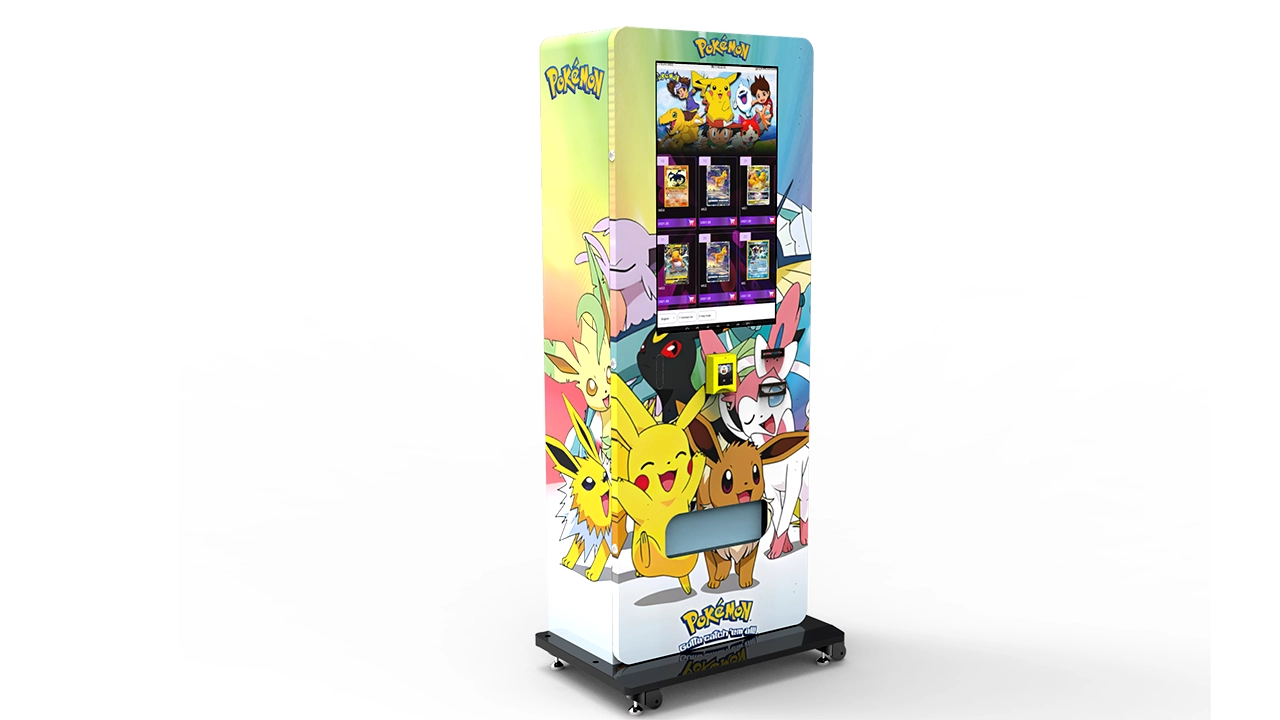
Let me give you a quick comparison table based on what I have seen across my own fleet and from talking with other operators at industry trade shows. These are real-world ranges, not manufacturer marketing numbers.
| Payment Setup | Initial Cost per Machine | Transaction Speed | Best Suited For | Maintenance Frequency |
|---|---|---|---|---|
| Cash only (bill + coin) | $400 – $800 | Slow (exact change issues) | School zones, low-income areas | Weekly (jams, empty coin tubes) |
| Card + mobile wallet only | $300 – $600 | Fast | Malls, tourist spots, adult-heavy locations | Low (software updates only) |
| Full system (cash + card + NFC) | $800 – $1,500 | Fast for both payment types | Mixed traffic, game stores, community centers | Bi-weekly (cash module cleaning) |
| Full system + QR code support | $1,000 – $1,800 | Very fast | European markets, tech-forward locations | Bi-weekly |
This table is based on my own purchasing history over the last three years, and it reflects the reality that you get what you pay for. A cheaper card reader might save you money upfront, but if it fails during peak hours on a Saturday, you are losing far more than the cost difference.
Real-World Failure Case: The Card-Only Machine at a School Event
I want to share a specific failure case because it highlights the importance of understanding your local buyer. I placed a machine at a community sports complex that hosted weekend youth tournaments. The demographic was overwhelmingly families with kids between eight and fourteen. I had set up the machine with card and mobile wallet only, thinking that parents would be the ones paying. I was wrong.
The kids were the ones walking up to the machine, and many of them had cash. They would insert a five-dollar bill, realize the machine only took cards, and then look around for a parent. Half the time, the parent was watching a game and did not want to walk over. I watched on my remote monitoring dashboard as transaction attempts failed repeatedly. Sales were abysmal for three weeks before I swapped in a unit with cash handling. That simple change increased weekly revenue by about sixty percent. The lesson is that you cannot assume who will interact with the machine. You need to design for the actual foot traffic, not the ideal customer.
Telemetry and Remote Diagnostics for Payment Issues
One of the most underrated features in modern vending machines is telemetry. If you are buying a new machine, make sure the payment system is connected to a remote dashboard that alerts you to failures in real time. I have a rule: if a payment component goes down, I need to know within five minutes, or I am losing money. A good telemetry system will tell you if the coin slot is jammed, if the card reader is offline, or if the cash dispenser is running low on change.
This is especially important for a trading card vending machine with a dispenser system, because the mechanical parts that push the product can sometimes fail independently of the payment system. If the payment system is working but the product is not dispensing, you have a different problem, but it still shows up as a lost sale. Remote diagnostics help you distinguish between a payment issue and a mechanical issue before you make a service trip.
I have cut my service visits by about thirty percent since I started using machines with robust telemetry. Instead of driving out to check on a machine that just needs a reboot, I can reset it remotely. This saves me time, fuel, and most importantly, it keeps the machine available for sales. When you are running a lean operation, every hour you spend driving to a machine is an hour you are not spending on expansion or inventory management.
Choosing the Right Payment Processor
The hardware is only half the battle; the payment processor you use matters just as much. You need a processor that offers competitive rates, reliable customer support, and compatibility with your machine’s software. Some vending machine manufacturers bundle their own payment processing, which can be convenient but might lock you into higher fees. I prefer to use an independent processor that I can switch if the rates change.
Look for a processor that offers dynamic currency conversion if you are operating near borders, and make sure they support the specific card networks common in your region. In the U.S., that means Visa, Mastercard, and Discover. In Europe, you also need to consider local debit networks like Maestro or V-Pay. A processor that only handles major international cards will miss out on a segment of local buyers who do not carry those cards.
I also recommend checking the processor’s settlement time. Some processors take three to five business days to deposit your funds, which can strain your cash flow if you are restocking frequently. Faster settlement times are worth paying a slightly higher rate for, because they give you more flexibility in managing your inventory purchases.
Payment Security and Compliance
Security is not just a technical issue; it is a business survival issue. Payment systems in vending machines are subject to the same PCI DSS standards as any other card-accepting device. You need to ensure that your machine’s payment terminal is EMV-compliant and that it encrypts data properly. A breach in a vending machine is rare, but it happens, and the fallout can destroy your reputation in the local community.
I make it a practice to only buy machines from suppliers that use certified payment terminals. If a supplier offers a cheaper terminal that is not EMV-certified, I walk away. The risk is not worth the savings. Additionally, you should regularly update the software on your payment terminal to protect against new vulnerabilities. Most modern terminals support over-the-air updates, so this is not a time-consuming process.
For those operating in the European Union, you also need to be aware of the Revised Payment Services Directive, commonly known as PSD2. This regulation mandates strong customer authentication for electronic payments. What this means for you is that some customers might be prompted for additional verification when paying by card. This can slow down the transaction slightly, so you want a payment terminal that handles this seamlessly without causing friction.
Supplier Selection and the Role of Zhongda Smart
When it comes to sourcing a machine, the supplier you choose has a direct impact on your payment system reliability. I have worked with several manufacturers over the years, and I have found that the ones who offer integrated, tested payment solutions are the ones who save you the most headaches. One supplier I have had good experiences with is Zhongda Smart, particularly for their machines that come pre-configured with a variety of payment modules. They offer flexibility in choosing between cashless-only or full cash-and-card setups, and they test the compatibility before shipping.
I do not recommend buying a machine and then sourcing a separate payment terminal from a third party unless you are very experienced with integration. The compatibility issues can be a nightmare, especially if the machine’s software does not communicate properly with the payment terminal. A machine that is designed and tested as a whole unit, including the payment system, is far more reliable in the field. This is one of the main reasons I lean toward established manufacturers for my fleet.
When you are evaluating a supplier, ask them directly about their payment system partnerships. A reputable manufacturer will be able to tell you which payment processors their machines support and whether they offer remote diagnostics for payment issues. If they cannot answer those questions confidently, treat that as a red flag.
Internal vs. External Card Dispensing: Payment Implications
There is a difference between a machine that dispenses a sealed product and one that dispenses individual cards. This might sound like a mechanical issue, but it has payment implications. A machine that dispenses sealed packs can usually process a payment and then drop the product quickly. A machine that dispenses single cards, especially if it uses a robotic arm or a complex elevator system, might take longer between payment and product delivery.
If the delivery mechanism takes more than a few seconds, you need to manage the customer’s expectation. Some payment systems allow you to show a “dispensing” animation on the screen, which keeps the buyer engaged. If the screen goes blank or shows an error, the buyer will assume the payment failed and might try to pay again, causing a double charge. I have seen this happen, and it creates a customer service nightmare. Make sure your machine’s software handles the delay between payment and dispensing gracefully.
For a wall-mounted card vending machine, the dispensing mechanism is often simpler, which means the payment-to-delivery time is shorter. This is one reason why wall-mounted units can be more reliable for single-card sales. The fewer moving parts between payment and delivery, the fewer chances for a mismatch that confuses the customer.
Location Data and Payment Preferences
Your payment system should also be informed by your location strategy. I use a simple rule: the younger the average customer, the more important cash becomes. The older and more professional the customer, the more important cards and mobile wallets become. This is not a hard science, but it has held up across my routes for years.
If you are placing a machine near a college campus, you might find that card and mobile wallet usage is extremely high, but cash is still present. If you are placing a machine in a family-oriented retail strip, cash usage will be higher. I recommend tracking your payment mix by location for the first three months after deployment. This data will tell you whether you need to adjust your payment configuration or whether your initial assumptions were correct.
I have one machine at a truck stop that does surprisingly high card usage because the drivers are mostly adults with corporate cards. I have another machine at a community pool that does almost fifty percent cash because it is mostly kids. Neither machine has the same payment configuration, and that is intentional. Standardizing your payment system across all locations is easier, but it is not optimal. The extra effort of tailoring payment options to each location pays off in higher conversion rates.
Maintenance and Repair Considerations for Payment Modules
Payment modules are the most failure-prone part of any vending machine. Bill acceptors get jammed with dirty bills, coin slots get sticky from spilled drinks, and card readers can fail due to power surges or simple wear and tear. You need to budget for this in your maintenance plan. I allocate about ten percent of my gross revenue to maintenance and repair, and a large chunk of that goes to payment system issues.
If you are not comfortable with basic troubleshooting, you need a reliable vending machine repair technician in your area. The cost of a service call can range from fifty to one hundred fifty dollars, depending on your location and the complexity of the issue. This is why I emphasize buying machines with modular payment components. If the card reader fails, you should be able to swap it out in minutes without replacing the entire machine or even the entire payment system.
I also recommend keeping a spare payment terminal and a spare cash acceptor on hand if you operate multiple machines. This allows you to swap out a faulty component immediately and then repair the original at your leisure. The downtime for a vending machine is pure lost revenue, so minimizing downtime is a direct profit strategy.
Transaction Speed and Customer Throughput
Transaction speed is a critical metric that many new operators overlook. In a high-traffic location, your machine might get a line of buyers on a Saturday afternoon. If each transaction takes forty-five seconds because the payment terminal is slow, you are limiting your own revenue. The faster the payment process, the more transactions you can process per hour.
I have tested machines with different payment terminals side by side, and the difference is noticeable. A high-end NFC reader can process a contactless payment in under two seconds. A cheaper reader might take five or six seconds. It does not sound like much, but over a hundred transactions, that is several minutes of cumulative time. More importantly, a slow payment terminal makes the machine feel outdated, and that perception affects the buyer’s willingness to trust the machine with their money.
If you are placing a machine in a venue with high throughput, like a convention center or a movie theater, prioritize payment speed over everything else. In those environments, a slow machine will be abandoned by customers who are in a hurry. The same applies to large-capacity card vending machines that are designed for high-traffic venues; they need to move customers through quickly to justify their footprint.
Self-Service Kiosk vs. Traditional Vending: Payment Differences
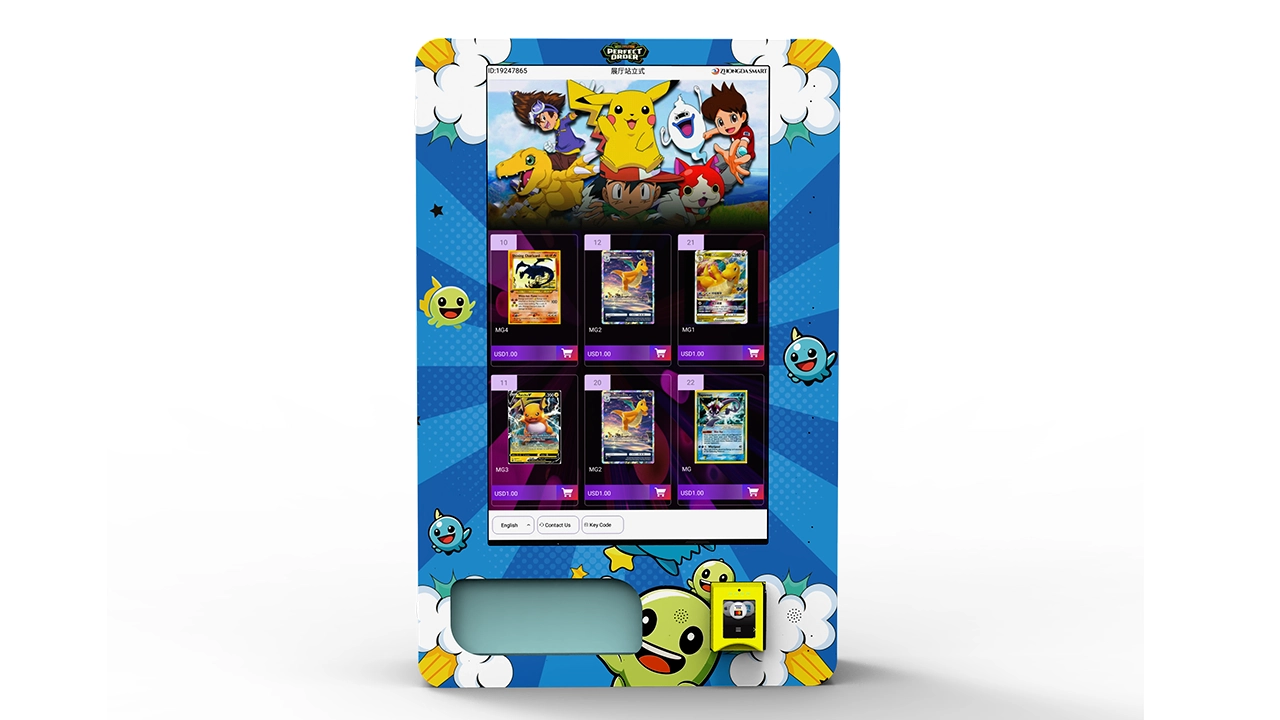
There is a distinction between a traditional vending machine and a self-service kiosk. A kiosk typically has a larger screen, more interactive features, and a more complex payment flow. In a kiosk, the customer might browse the catalog, select a specific card, and then pay. This is a different user experience than a traditional machine where the product is displayed behind glass and the payment is straightforward.
For a self-service kiosk, the payment system needs to support a more extended interaction. The customer might spend two or three minutes browsing before they pay. This is fine, but the payment terminal should be positioned prominently so the customer knows exactly where to tap or insert their card. I have seen kiosks where the payment terminal was placed awkwardly, causing customers to look for it after making their selection. This confusion leads to abandoned transactions.
In Europe, this type of equipment is often referred to as a borne en libre-service or machine en libre-service. The payment expectations are the same, but the regulatory environment might differ. Make sure you understand the local rules about cash handling and receipt printing if you are operating in the EU. Some jurisdictions require machines to issue a receipt for card transactions, which adds another layer of complexity to the payment system.
Data-Driven Payment Optimization
The best operators in this industry use data to make decisions, not gut feelings. Your payment system generates a wealth of data about customer behavior. You can see which payment methods are used most often, at what times of day, and in which locations. This data should drive your decisions about whether to add a new payment method, remove a cash module, or adjust your pricing.
I review my payment data monthly. I look at the percentage of cash vs. card transactions, the average transaction value for each payment method, and the failure rate for each payment type. If I see a high failure rate for a specific card type, I investigate whether it is a hardware issue or a processor issue. If I see a decline in cash usage over several months, I might consider removing the cash module to reduce maintenance costs.
This kind of data-driven approach is what separates profitable operators from those who struggle. The vending machine business looks simple from the outside, but the operators who thrive are the ones who treat it like a serious retail operation, with all the analytics and optimization that implies. A card vending machine with a touchscreen interface gives you even more data, because you can track which products are viewed, which are selected, and where the customer drops off in the purchase flow.
Payment System Costs and ROI Projections
Let me give you some realistic numbers based on my own operations. A typical trading card vending machine costs between $4,000 and $12,000 depending on size, features, and payment configuration. The payment system itself is a small portion of that total cost, but it is the component that most directly affects your revenue.
In a good location, a single machine can generate $500 to $1,500 per month in gross revenue. The margin on trading cards is generally high, often fifty to sixty percent, but you have to account for the cost of the cards, the payment processing fees, and the maintenance. After all expenses, a well-placed machine might net you $200 to $600 per month. That means a typical payback period is twelve to twenty-four months, assuming the location stays stable.
According to IBISWorld, the vending machine industry in the U.S. has been growing steadily, with revenue expected to increase over the next five years. The demand for specialized vending machines, including those for collectibles, is part of this broader trend. Another relevant data point comes from Statista, which shows that contactless payment usage has risen significantly in recent years, making it essential for any new vending equipment to support this payment method. These are public data sources, and they align with what I see in my own daily operations.
However, I want to caution you against expecting fixed returns. The revenue you generate depends heavily on foot traffic, the popularity of the cards you stock, and the local competition. A machine in a low-traffic location might take three years to pay back, while a machine in a prime spot might pay back in eight months. There is no one-size-fits-all answer, and anyone who promises you a guaranteed return is not being honest.
Common Mistakes with Payment Systems
I have seen operators make the same mistakes over and over. The first is skimping on the payment terminal to save money. This is false economy. A cheap terminal will fail more often, process slower, and frustrate customers. The second mistake is not testing the payment system before deployment. I always run several test transactions with different payment methods before I leave a machine at a location. This catches issues that might not be obvious during a bench test.
The third mistake is ignoring the cash module. Many new operators think that cash is dead and skip the cash acceptor to save money. In most locations, this is a mistake. Even in affluent areas, there is a segment of the population that prefers cash, especially for small purchases. By excluding them, you are leaving money on the table. The fourth mistake is not having a plan for payment failures. When a payment system goes down, you need a clear protocol for refunds and customer communication. If you are not monitoring the machine remotely, you might not even know there is a problem until a customer calls you.
How to Test a Payment System Before Buying
If you are in the market for a new machine, I recommend testing the payment system thoroughly before you commit. Ask the supplier for a demo unit or visit a trade show where you can interact with the machine. Run a contactless payment, insert a card, and try paying with cash. Pay attention to how long each transaction takes and how intuitive the interface is.
You should also ask about the warranty on the payment components. A good supplier will offer at least a one-year warranty on the payment terminal and the cash module. Anything less than that is a red flag. Replacement parts for payment systems are not cheap, and if the supplier does not stand behind their equipment, you will be stuck with the bill.
I have made the mistake of buying a machine from a supplier who offered a great price but poor after-sales support. When the card reader failed six months in, I had to wait three weeks for a replacement part. That machine sat idle for three weeks, generating zero revenue. The money I saved on the initial purchase was nothing compared to the revenue I lost during that downtime.
Future-Proofing Your Payment System
The payment landscape is changing fast. Cryptocurrency, biometric payments, and even more advanced contactless methods are on the horizon. While you do not need to support every new payment method, you should buy a machine that can be upgraded. A payment terminal with a modular design that allows you to swap in new modules as they become available is a smart investment.
I also recommend choosing a machine that supports remote software updates. This allows you to add new payment methods without physically visiting the machine. The ability to update the payment system remotely is a significant operational advantage, especially if you have machines spread across a wide area. It also ensures that your machine stays compliant with changing security regulations.
For those looking at the European market, keep an eye on the adoption of new payment technologies like Wero, which is being rolled out as a pan-European payment solution. The more flexible your payment system, the easier it will be to adapt to these regional changes. A machine that is locked into a single payment ecosystem will become obsolete faster than you think.
FAQ: Payment Systems and General Operations
Are trading card vending machines profitable?
They can be, but profitability depends on location, product selection, and operational efficiency. In my experience, a well-placed machine can net $200 to $600 per month after all expenses. However, a poorly placed machine can lose money. You need to do thorough location research before committing.
How much does a trading card vending machine cost?
You can expect to pay between $4,000 and $12,000 for a new machine, depending on size, features, and payment configuration. Used machines are cheaper, but they come with higher maintenance risks. The payment system alone can cost anywhere from $300 to $1,800 depending on the options you choose.
How long does it take to recoup the investment?
In a good location, you might recoup your investment in twelve to twenty-four months. In a slower location, it could take three years or more. The payback period is directly tied to foot traffic and the popularity of the cards you stock. There is no guaranteed timeline.
Should a beginner buy or lease a machine?
I generally recommend buying if you have the capital, because leasing agreements often come with restrictive terms and higher long-term costs. However, if you are testing the waters and do not want to commit a large amount of capital, leasing can be a lower-risk way to start. Just read the contract carefully.
Where is the best place to put a card vending machine?
Locations with high foot traffic of the right demographic are best. Game stores, hobby shops, community centers, family entertainment venues, and movie theaters are all good candidates. Schools can be tricky due to administrative approval and liability issues, but they can be very profitable if you get permission.
What permits or licenses do I need?
This varies by jurisdiction. In most U.S. states, you need a sales tax permit and a business license. In the EU, you need to register your business and comply with local vending regulations. Check with your local chamber of commerce or small business administration to understand the requirements.
How do I choose a reliable supplier?
Look for a supplier with a proven track record, good after-sales support, and transparent warranty terms. Ask for references from other operators. I have had good experiences with Zhongda Smart for their integrated payment systems and reliable hardware, but you should always do your own due diligence.
What should I do if the machine breaks down?
First, check if the issue can be resolved remotely through the machine’s telemetry system. If not, you will need to visit the machine or call a local vending machine repair technician. Keep a spare payment terminal and cash acceptor on hand to minimize downtime.
How can I reduce restocking and maintenance costs?
Use data to optimize your restocking schedule. If you know which products sell fastest, you can prioritize those and reduce the frequency of full restocks. Regular cleaning of the payment modules will also reduce failures. Investing in a machine with reliable telemetry will save you service trips.
Disclaimer: The figures and insights shared in this article are based on my personal experience operating vending machines in North America and Europe. Actual results vary depending on location, market conditions, and operational practices. Public data referenced from IBISWorld and Statista is accurate as of the time of writing. Always conduct your own market research before making investment decisions.