If you’ve been watching the trading card market over the last few years, you already know that Pokémon cards aren’t just for kids anymore. I’ve been in the vending business for over a decade, and I can tell you that the custom Pokemon card vending machine trend is one of the most interesting shifts I’ve seen in automated retail. These machines are popping up in malls, hobby shops, and even grocery store lobbies, and they’re pulling serious revenue when placed correctly. But before you drop thousands of dollars on a machine, you need to understand what you’re actually buying, what it costs to run, and whether the numbers make sense for your specific location. This is not a get-rich-quick scheme, but it can be a solid side business or even a full operation if you treat it like one.
Why Trading Card Vending Machines Are Gaining Traction
The demand for Pokémon and sports cards has exploded since 2020, and the secondary market has become a legitimate investment space. Collectors are tired of hunting through retail stores only to find empty shelves, and they’re increasingly turning to self-service kiosks that offer a curated, always-in-stock experience. I’ve seen mall operators who never considered vending suddenly asking about these units because foot traffic alone can justify the real estate.
What makes a custom Pokemon card vending machine different from a standard snack vender is the product value per cubic inch. A single pack of Pokémon cards can retail for five to fifteen dollars, and a sealed booster box can go for over a hundred. That means you can generate serious revenue without needing a massive machine footprint. The margins are also healthier than most traditional vending categories, provided you source your product correctly and manage your inventory rotation.
From my experience, the key is to treat this like a retail category, not a novelty. The machines that succeed are the ones that offer variety, fair pricing, and a clean, engaging user experience. A machine that just dumps random packs with no thought to what’s selling will fail fast. You have to know your local collector base, what sets are trending, and when to rotate stock before it becomes dead inventory.
Understanding the Core Costs of a Custom Pokemon Card Vending Machine
Let’s talk money, because that’s what everyone asks about first. A basic off-the-shelf trading card vending machine will run you anywhere from $4,000 to $8,000 depending on the manufacturer and features. But if you want a truly custom Pokemon card vending machine with a 32-inch touchscreen, remote monitoring, and a secure dispensing system, you’re looking at $8,000 to $15,000 per unit. I’ve also seen high-end configurations with custom lighting and branding push past $18,000, but that’s usually for flagship locations where presentation matters as much as function.
That price tag is just the beginning. You need to factor in shipping, which can be $500 to $1,200 depending on where you are, plus installation and any electrical or networking work at the site. If you’re placing the machine in a mall or a grocery store, you’ll likely need to pay a commission or a flat monthly rental to the host location. I’ve negotiated deals ranging from 10% of gross sales to a flat $200 per month, depending on the venue’s foot traffic and the perceived value you bring.
Then there’s the inventory. This is where a lot of new operators underestimate the capital required. You need to stock the machine with enough product to look attractive, but not so much that you’re tying up cash in slow-moving items. I usually recommend starting with $2,000 to $3,000 in initial inventory for a single machine, focusing on a mix of booster packs, tins, and a few higher-ticket sealed products. You’ll also need to budget for restocking every one to two weeks, which means you need access to a reliable wholesale distributor or a direct relationship with a supplier who can get you product at near-retail margins.
Maintenance and repair costs are another line item people forget. A card vending machine is more complex than a traditional snack machine because it has to handle card dispensing without jamming or damaging the product. I’ve seen machines with flimsy dispensing mechanisms fail within six months, and the repair costs can eat into your profits quickly. Expect to spend $300 to $600 per year on routine maintenance, and set aside another $500 for unexpected breakdowns. This is why I always tell people to buy from a manufacturer with a solid warranty and a responsive support team, not just the cheapest option on Alibaba.
Realistic Revenue Projections and Payback Period
Now for the question that determines whether you should even consider this: does a custom Pokemon card vending machine actually make money? In my experience, a well-placed machine in a high-traffic hobby shop or mall can gross $1,500 to $4,000 per month. I’ve seen exceptional locations in tourist-heavy areas push $6,000 a month during peak seasons, but that’s the exception, not the rule. A typical location in a mid-tier retail plaza might only do $800 to $1,200 per month, which still covers costs but won’t make you rich.
Your net margin depends heavily on how you source product. If you’re buying at wholesale from a distributor, your cost of goods is usually 50% to 60% of retail. That means on a $1,500 monthly gross, you’re looking at $600 to $750 in gross profit before rent, maintenance, and your own time. Subtract $200 for site commission and $50 for maintenance, and you’re left with $350 to $500 per machine per month. That’s not a huge number, but if you scale to five or ten machines, it becomes a meaningful income stream.
Payback period is typically 12 to 18 months for a new machine, assuming you’ve secured a decent location and you’re disciplined about inventory management. I’ve seen operators hit payback in nine months when they found a killer spot with no competition, and I’ve seen others struggle for two years because they ignored basic site selection. The single biggest variable is location, not the machine itself. If you place a machine in a spot with low foot traffic or the wrong demographic, no amount of custom branding will save you.
According to a 2023 Statista report, the global vending machine market is projected to grow at a compound annual growth rate of about 7% through 2030, driven largely by automated retail and self-service kiosks. That tells me the trend isn’t a flash in the pan, but it also means more operators are entering the space, so you need to be smarter than the next guy.
Location, Location, Location: How to Pick the Right Spot
I can’t stress this enough: the success of a custom Pokemon card vending machine is 80% location and 20% execution. I’ve placed machines in high-end malls that failed because the foot traffic was all families with young kids who weren’t ready to drop $15 on a booster pack. Meanwhile, a machine in a small comic book shop in a strip mall did three times the volume because the customer base was already there and the shop owner promoted it to his regulars.
You want locations where the target demographic already gathers. Hobby shops, comic book stores, gaming cafes, and even certain movie theaters are prime candidates. I’ve also had success with laundromats and bowling alleys, but only in areas with a strong collector community. The key is to evaluate the existing foot traffic, not just the number of people passing by, but whether they fit the profile of a trading card buyer.
When I evaluate a potential site, I look at three things: daily foot traffic, average dwell time, and the presence of complementary businesses. A location with 500 people passing through per day but only a 5% match rate to your target customer is worse than a location with 200 people passing through and a 30% match rate. I also check whether there’s already a trading card retailer nearby. If there is, that’s actually a good sign because it proves demand, but you need to position your machine as a convenience, not a competitor. If the nearby shop is overpriced or poorly stocked, your machine can win by offering better selection and transparent pricing.
I’ve also learned to negotiate hard on site commissions. Many mall operators will ask for 20% of gross sales, but I’ve successfully bargained down to 10% by pointing out that my machine brings in a demographic that tends to spend elsewhere in the mall. If you’re placing in a grocery store or a big-box retailer, they might not even want a commission, just a flat monthly fee for floor space. Always get the terms in writing and make sure you understand the cancellation policy before you commit to a long-term placement.
Comparing Different Machine Types and Configurations
Not all trading card vending machines are created equal, and the configuration you choose should match your location and your budget. I’ve tested everything from compact wall-mounted units to full-size kiosks with multiple shelves and a 32-inch touchscreen. Each has its pros and cons, and what works for a small hobby shop might not work for a busy mall entrance.
Here’s a comparison table based on my experience with different setups:
| Machine Type | Typical Cost | Footprint | Best For | Pros | Cons |
|---|---|---|---|---|---|
| Wall-Mounted Card Machine | $3,000 – $6,000 | Minimal, mounts on any wall | Small shops, cafes, narrow spaces | Low upfront cost, easy to install, doesn’t take floor space | Limited inventory capacity, less visual impact |
| Standard Freestanding Unit | $6,000 – $10,000 | Medium, about 2x2 feet | Hobby shops, game stores, mid-traffic retail | Good balance of cost and capacity, can hold 300+ products | Requires more floor space, needs better security |
| Large Touchscreen Kiosk | $12,000 – $18,000 | Large, 3x3 feet or more | Malls, entertainment venues, high-traffic areas | High visual appeal, interactive screen can boost engagement, more product variety | Expensive upfront, higher maintenance, needs reliable power and internet |
| Refurbished/Used Machine | $2,000 – $5,000 | Varies | Budget-conscious operators | Cheapest entry point, can be upgraded over time | Higher risk of breakdown, outdated tech, limited warranty |
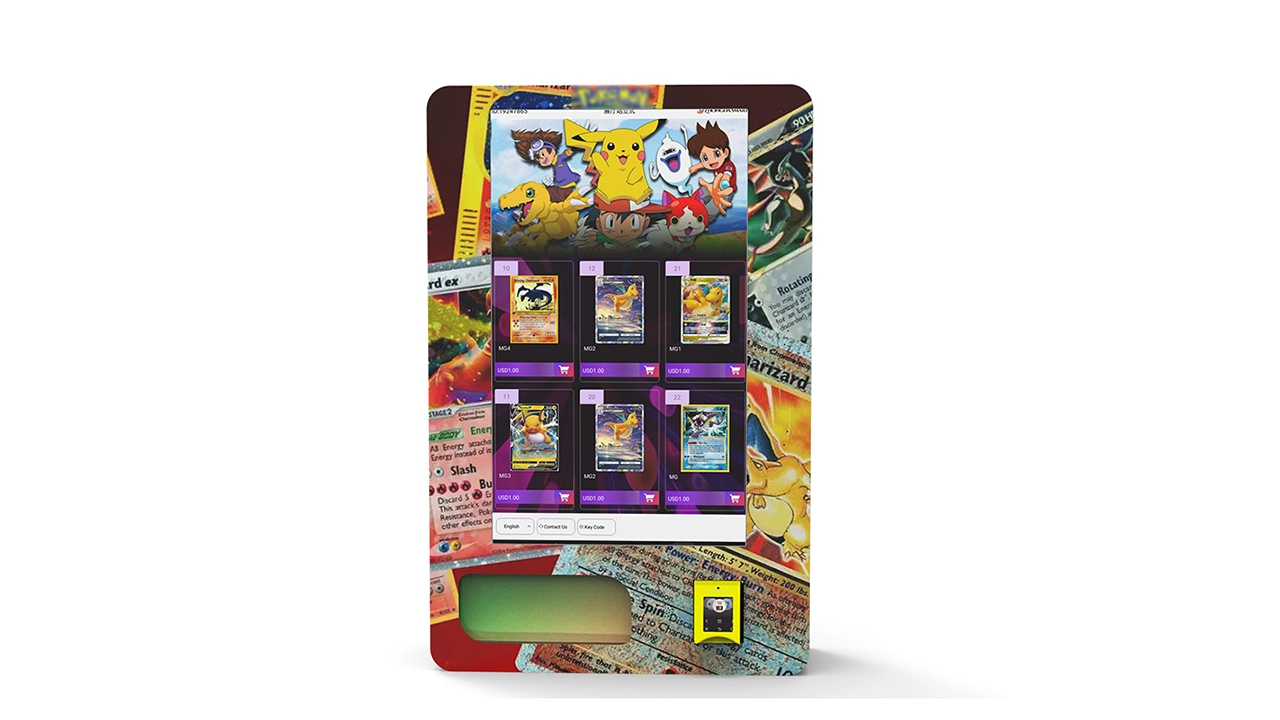
From my experience, the sweet spot for most new operators is a standard freestanding unit with a 24-inch or 32-inch screen. It’s not the cheapest option, but it gives you enough capacity to offer a decent selection without overwhelming your inventory budget. The wall-mounted units are great for low-traffic locations where you want to test the waters, but you’ll quickly run into capacity limits if the location performs well.
One thing I’ve learned the hard way: don’t skimp on the dispensing mechanism. I once bought a budget machine that used a simple spiral coil to push out card packs, and it jammed every third transaction. Customers would get frustrated, leave without buying, and I’d have to drive 40 minutes to unjam it. The cost savings upfront were completely eaten by repair calls and lost sales. Now I only recommend machines with a tray-based or vertical drop dispensing system that’s designed specifically for flat card products.
Supplier Selection: How to Avoid Getting Burned
Choosing the right manufacturer is just as important as choosing the right location. I’ve seen operators order from overseas suppliers without doing their homework, only to receive a machine that doesn’t meet US electrical standards or has a user interface that’s impossible to navigate for English-speaking customers. That’s why I always recommend working with a supplier who has a local presence or at least a proven track record with international customers.
One name that I’ve come across in recent years is Zhongda Smart, a manufacturer that specializes in smart vending machines, including trading card models. I’ve seen their equipment at trade shows, and they offer a range of configurations from basic units to fully custom touchscreen kiosks. They’re not the only player in the market, but they’re worth considering if you’re looking for a balance between price and features. I’d still advise you to request a sample unit or a detailed spec sheet before committing to a bulk order, and always ask about their after-sales support and warranty terms.
When evaluating any supplier, I look at four things: build quality, software reliability, spare parts availability, and response time. A machine that breaks down and takes three weeks to get a replacement part is a money pit. Ask the supplier how many units they have in the field, what the average failure rate is, and whether they have a local technician network or just a remote support hotline. I’ve found that suppliers who offer remote diagnostics via a cloud platform are significantly easier to work with, because they can often fix a software issue before you even need to visit the site.
I also recommend getting references from other operators who use the same machine. Don’t just rely on the supplier’s marketing materials. Ask for a list of customers in your region and reach out to them directly. A quick phone call can save you thousands of dollars and months of frustration. I’ve personally avoided two bad purchases this way, and I’ve also discovered some great suppliers that I wouldn’t have found otherwise.
Payment Systems and the Unattended Retail Experience
The payment system is the heart of any self-service kiosk. If the card reader is slow, the screen is confusing, or the machine doesn’t accept the payment method your customers prefer, you’re losing sales. In the US and Europe, that means you need to support credit cards, debit cards, and increasingly mobile payments like Apple Pay and Google Pay. Some machines also offer cash acceptance, but I’ve found that cashless-only is fine for most locations, especially since card packs are a relatively high-value item.
One thing to watch out for is the transaction fee structure. Most card readers charge a flat fee plus a percentage per transaction, which can eat into your margin if you’re selling low-priced items. I’ve seen operators get hit with 30 cents per transaction plus 2.9%, which on a $5 pack of cards is a significant chunk. Look for a payment processor that offers a lower flat fee for smaller transactions, or negotiate a custom rate if you expect high volume.
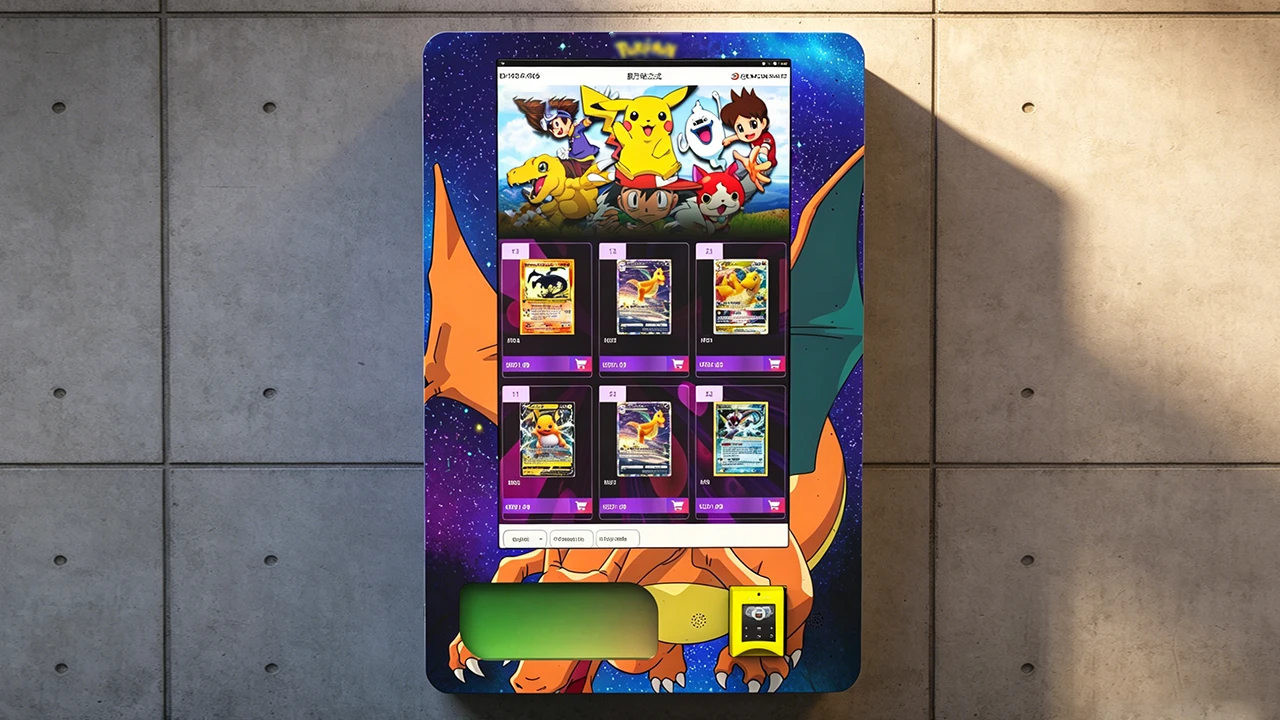
The user experience matters more than you might think. A custom Pokemon card vending machine with a touchscreen should feel intuitive, not like you’re navigating a 1990s ATM. I’ve seen machines that show a full catalog of products with images and prices, allowing customers to browse before they pay. That kind of interaction increases average transaction value because people tend to add an extra pack or two when they can see what’s available. I’ve also seen machines that gamify the experience with a “mystery pack” option, which is a huge hit with younger buyers.
Remote monitoring is another feature I won’t operate without anymore. A machine that can send you a real-time alert when inventory is low or when a dispensing error occurs saves you from lost sales and angry customers. I’ve had machines that were out of stock for three days before I noticed, and that’s three days of zero revenue in a prime spot. With a cloud-based management platform, I can check inventory levels from my phone and schedule restocking only when needed.
Maintenance, Restocking, and Common Failures
Let’s be honest: vending machines break. It’s not a matter of if, but when. The most common issues I’ve encountered with card vending machines are jammed dispensers, faulty card readers, and screen calibration problems. A jammed dispenser is usually caused by a bent card pack or a misaligned tray, and it can be fixed on-site with a simple reset. But if the dispensing mechanism is poorly designed, you’ll be dealing with this on a weekly basis.
Restocking is a routine task, but it requires discipline. I recommend setting a fixed schedule, usually every 7 to 10 days, depending on your sales velocity. When you restock, you should clean the machine, check for any wear on moving parts, and rotate your inventory so that older product is sold first. I also keep a log of what sells and what doesn’t, so I can adjust my orders accordingly. A machine that’s stocked with the same slow-moving product for months is a wasted opportunity.
I’ve also learned to keep a small inventory of spare parts on hand. A spare card reader, a replacement screen, and a few dispensing trays can be the difference between a one-day downtime and a two-week nightmare. If you have multiple machines, this is even more critical. I’ve built a relationship with my supplier so that I can order parts quickly, and I always have a backup plan for emergency repairs.
One failure case that still haunts me: I placed a machine in a busy mall entrance, but I didn’t account for the fact that the location had a lot of direct sunlight. The screen started to overheat and eventually went black. It took me two weeks to figure out that the issue was heat-related, not a software bug. By the time I installed a sunshade, I’d lost almost $800 in potential sales. Now I always ask about the lighting conditions at a site before I commit to a placement.
Scaling Up: From One Machine to a Small Fleet
Once you’ve proven that a single machine works, the natural next step is to scale. But scaling too fast is a common mistake. I’ve seen operators buy five machines at once, only to realize they can’t manage the restocking logistics or the cash flow. Start with one or two machines, learn the ropes, and then expand gradually. A fleet of five machines that are all profitable is better than ten machines where half are losing money.
When you scale, you also need to think about route planning. If your machines are spread out across a city, you’ll spend a lot of time driving. I try to cluster my machines in the same geographic area so that a restocking run can cover three or four locations in one trip. This reduces labor costs and makes it easier to respond to emergencies.
Another scaling consideration is whether to hire a part-time assistant or do everything yourself. For the first year, I did everything solo, which meant working nights and weekends. Once I had six machines generating consistent revenue, I hired a part-time worker to handle restocking and basic maintenance. That freed me up to focus on finding new locations and negotiating better supplier deals.
An Honest Comparison: Self-Operate vs. Lease vs. Revenue Share
New operators often ask whether they should buy their own machine, lease one, or enter into a revenue-sharing agreement with a location. Each model has its place, and the right choice depends on your capital, your risk tolerance, and your operational capacity.
Self-operating gives you the most control and the highest profit potential, but it also carries the most risk. You’re responsible for the machine, the inventory, and the maintenance. Leasing is a good middle ground if you have less capital, but you’ll pay a monthly fee that eats into your margin. Revenue sharing with a host location is attractive because you don’t pay rent, but you give up a percentage of sales, and you’re still responsible for all the operational aspects.
I’ve seen successful operators use all three models. One friend of mine leases machines from a manufacturer and places them in barbershops, paying a 15% commission to the shop owner. He doesn’t own any machines, but he also doesn’t have a huge upfront investment. Another operator I know owns all his machines and has negotiated flat monthly rent deals with grocery stores, which gives him predictable costs.
For most people, I recommend starting with self-operation because it gives you the clearest picture of the economics. Once you understand the numbers, you can experiment with leasing or revenue sharing as a way to expand without tying up all your cash.
Legal and Regulatory Considerations
You can’t just put a machine anywhere and start selling. Depending on your state or country, you may need a vending machine permit, a sales tax license, and possibly a specific license for selling collectibles. In the US, most states require a general business license and a seller’s permit. Some municipalities also require a vending machine permit that must be renewed annually. I’ve had to deal with this in three different states, and the requirements vary significantly.
In the European Union, the rules are different. You’ll need to comply with the General Product Safety Directive and, if you’re using a card reader, with the Payment Card Industry Data Security Standard (PCI DSS). Some countries also have specific labeling requirements for vending machines, including displaying the operator’s contact information and the price of each product. I recommend checking with your local chamber of commerce or business development office to get a clear picture of what’s required in your area.
One thing that’s often overlooked is the issue of product authenticity. If you’re selling sealed Pokémon cards, you need to ensure they’re genuine and sourced from an authorized distributor. Selling counterfeit cards is not only unethical but also illegal, and it can ruin your reputation and get you banned from certain locations. I’ve seen operators get burned by buying “too good to be true” wholesale deals that turned out to be fakes. Always verify your supply chain.
FAQ: Answers to the Questions I Get Asked Most
Are trading card vending machines profitable?
Yes, they can be, but profitability depends heavily on location, product sourcing, and your ability to manage inventory. A well-placed machine can gross $1,500 to $4,000 per month, with net margins of 20% to 40% after all costs. But a poorly placed machine will lose money. Treat it like a retail business, not a passive income stream.
How much does a custom Pokemon card vending machine cost?
A new machine with basic features starts around $4,000, but a fully custom unit with a large touchscreen and remote monitoring can cost $12,000 to $18,000. You also need to budget for shipping, installation, inventory, and maintenance. Expect a total initial investment of $8,000 to $20,000 for your first machine.
How long does it take to recoup the investment?
In my experience, the payback period is typically 12 to 18 months for a well-placed machine. Some operators achieve nine months in exceptional locations, while others take two years or more if the site underperforms. The key is to start with a strong location and keep your operating costs low.
Should I buy or lease a machine as a beginner?
If you have the capital, buying is usually better in the long run because you build equity and control the machine. Leasing can be a good way to test the waters with less upfront risk, but you’ll pay more over time. Revenue sharing with a host location is another option, but you’ll give up a percentage of your sales.
Where should I place my machine to maximize revenue?
Look for locations where your target demographic already gathers: hobby shops, comic book stores, gaming cafes, and entertainment venues. Evaluate daily foot traffic, dwell time, and the presence of complementary businesses. Avoid locations with low foot traffic or a customer base that doesn’t match the trading card buyer profile.
What permits or licenses do I need?
In the US, you typically need a general business license, a seller’s permit, and possibly a local vending machine permit. In the EU, you’ll need to comply with product safety and data security regulations. Check with your local authorities to understand the specific requirements in your area.
How do I choose a reliable supplier?
Look for a manufacturer with a proven track record, good after-sales support, and a responsive service team. Ask for references from other operators and request a detailed spec sheet. I’ve worked with Zhongda Smart and found their machines to be reliable, but always do your own due diligence before committing.
What happens if the machine breaks down?
Most issues can be resolved with basic troubleshooting, but you should have a plan for emergency repairs. Keep spare parts on hand, and establish a relationship with a local technician who can handle complex issues. Remote monitoring software can also help you identify problems early before they become costly failures.
How can I reduce restocking and maintenance costs?
Plan your restocking routes to minimize travel time, and use remote monitoring to know exactly when a machine needs attention. Buy spare parts in bulk, and schedule routine maintenance to prevent small issues from becoming big problems. Also, negotiate with your supplier for better pricing on high-volume items.
Disclaimer: The information provided in this article is based on my personal experience and publicly available data. Revenue and cost figures are estimates and will vary based on location, market conditions, and operational decisions. Always conduct your own research and consult with a financial advisor before making any investment.