If you’re looking for the best TCG vending machine for Pokemon, Yu-Gi-Oh and MTG cards, the honest answer is that the machine itself matters far less than the system you build around it. I’ve spent over a decade running automated retail operations across North America, and I’ve seen operators lose money with top-tier hardware while others print cash with basic models. The difference comes down to location, inventory velocity, and how quickly you respond to sales data. In this guide, I’ll walk you through what actually works, what doesn’t, and where most newcomers trip up before they ever see a return on their trading card vending machine investment.
Why Trading Card Vending Machines Became a Real Business
The shift toward self-service kiosks in the hobby space didn’t happen overnight. For years, card shops operated on thin margins, relying on foot traffic and staff to move product. Then the pandemic changed how people bought collectibles. Buyers wanted contactless transactions, and sellers wanted to reduce labor costs. A card vending machine solves both problems, but only if you treat it like a retail location, not a vending machine.
I remember watching a friend install his first automated retail unit in a comic shop back in 2019. He loaded it with booster packs and hoped for the best. The machine sat there for two weeks without a single sale. The problem wasn’t the equipment; it was the lack of visibility and the wrong product mix. Once he moved it near the register and added a few single cards in top-loaders, sales picked up. That lesson stuck with me: the best TCG vending machine in the world won’t save a bad location or a lazy restock routine.
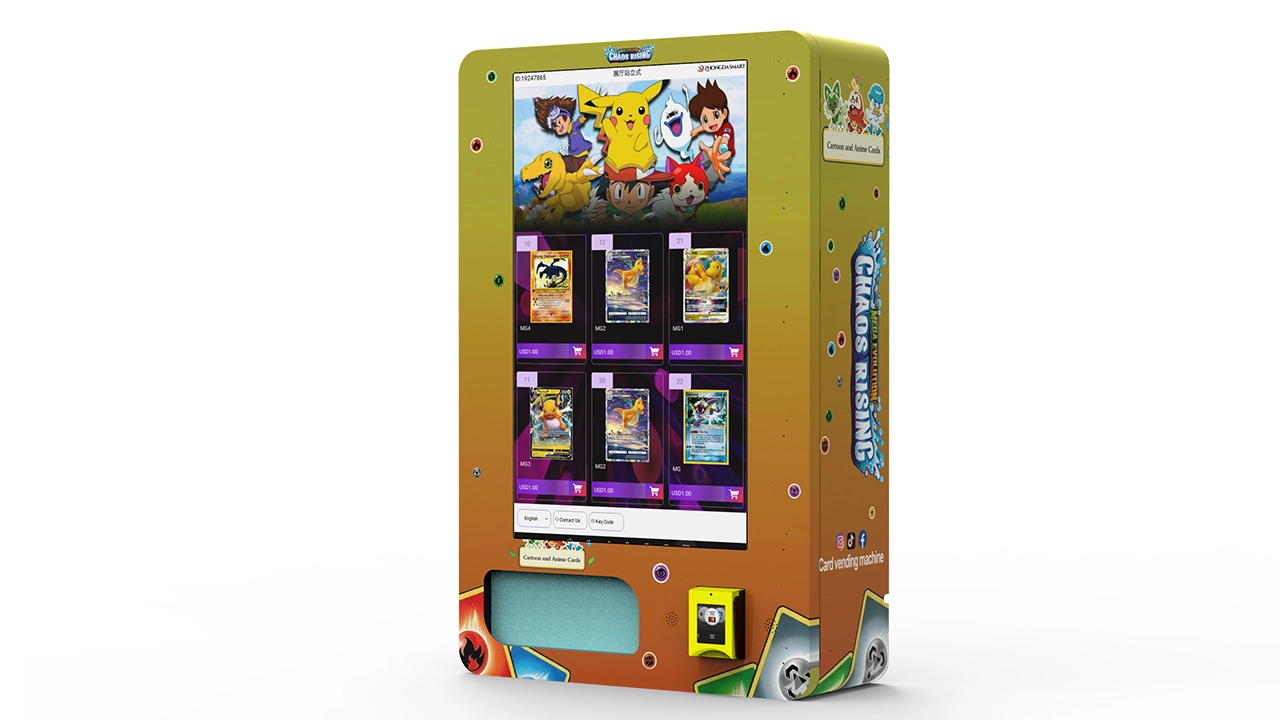
Today, the market has matured. You can buy a dedicated trading card vending machine, a 32-inch touchscreen model, or even a wall-mounted card vending machine depending on your space. Each option has trade-offs. But before you spend a dime, you need to understand what you’re really selling: convenience, selection, and the thrill of a possible rare pull.
Let’s get one thing straight. This isn’t passive income. It’s a retail business with lower overhead and fewer employees. You still have to buy inventory, manage cash flow, and keep the machine clean and functional. The sooner you accept that, the better your chances of building something profitable.
What a Trading Card Vending Machine Actually Costs
I’ll give you real numbers based on what I’ve seen across dozens of installations. A new, commercial-grade card vending machine typically runs between $8,000 and $20,000 depending on configuration. A 32-inch touchscreen model with adjustable shelves and secure locking mechanisms lands at the higher end. If you’re looking at a wall-mounted card vending machine, expect to pay $5,000 to $12,000, but you’ll sacrifice capacity and product variety.
Used machines are cheaper, but I’ve seen too many operators buy someone else’s headache. A used unit might cost $3,000 to $6,000, but you’ll likely sink another $1,000 into repairs and replacement parts within the first year. Unless you’re comfortable with vending machine repair, I’d steer you toward new equipment or a certified refurbished unit from a reputable supplier.
Here’s a rough breakdown of what I budget for a single location:
- Machine cost: $8,000–$20,000
- Shipping and installation: $500–$1,500
- Initial inventory (Pokemon, Yu-Gi-Oh, MTG): $3,000–$8,000
- Payment system setup and fees: $200–$500
- Signage and basic branding: $300–$800
That puts your total startup investment somewhere between $12,000 and $30,000 for the first unit. If you’re doing this on a shoestring, you can start with a used machine and lean inventory, but you’re also increasing the risk of downtime and lost sales. According to IBISWorld, the vending machine industry in the U.S. has grown steadily over the past five years, with operators reporting an average profit margin of around 15% after all expenses. That’s not a get-rich scheme, but it is a viable side business or a solid addition to an existing retail operation.
One thing I tell everyone: don’t max out your budget on the machine. Keep cash reserves for inventory restocks and unexpected repairs. A machine that sits empty for a week is a machine that loses money.
Location Is Everything: How I Evaluate Potential Spots
I’ve placed machines in game stores, comic shops, hobby shops, laundromats, and even a bowling alley. The results vary wildly. My rule of thumb is simple: you need at least 50 people passing by per hour during peak times, and those people need to already be collectors or curious enough to stop and look. A card vending machine in a busy grocery store might get plenty of eyeballs, but if the demographic isn’t right, you’ll see low conversion rates.
Game stores and comic shops are the obvious first choice. They already attract your target audience. But here’s the catch: many shop owners see your machine as competition. I’ve had successful placements where I split revenue with the store owner, and I’ve had outright rejections. If you do a revenue share, be transparent about your numbers and set clear expectations. A 70/30 split in favor of the store owner is common for high-traffic locations, but you need to negotiate based on the space and foot traffic.
Another overlooked option is college campuses and hobby-focused community centers. I placed a wall-mounted card vending machine in a university student lounge, and it did surprisingly well because the student body had an active trading card club. The machine required restocking twice a week, and the average transaction was around $15. Not bad for a location that cost me nothing in rent.
When I evaluate a potential spot, I look at three things: foot traffic, dwell time, and proximity to a point of sale. A machine near a cash register or entryway gets more attention than one tucked in a corner. People need to see it, and they need to feel comfortable browsing without blocking foot traffic. I also check whether the location has reliable power and internet, because modern card vending machines rely on telemetry to track inventory and sales.
If you’re considering a location, spend a few hours there on different days. Count the number of people who walk by, and note how many stop to look at vending machines or displays. That’s your realistic audience. Don’t rely on the landlord’s estimates; they’re almost always optimistic.
Comparing Machine Types: What Fits Your Operation
Not all card vending machines are created equal. I’ve tested flat-shelf models, spiral units, and high-end robotic dispensers. Each has its strengths and weaknesses, and the right choice depends on your product mix and location constraints.
Here’s a simple comparison table based on my experience:
| Machine Type | Cost Range | Capacity | Best For | Maintenance Level |
|---|---|---|---|---|
| Spiral / Coil | $5,000–$10,000 | Medium | Booster packs, sealed products | Low to medium |
| Flat Shelf / Tray | $8,000–$15,000 | High | Single cards, top-loaders, mixed SKUs | Medium |
| Robotic / Touchscreen | $15,000–$25,000 | High | Premium singles, high-value products | Higher, more moving parts |
| Wall-Mounted | $5,000–$12,000 | Low to medium | Small spaces, secondary locations | Low |
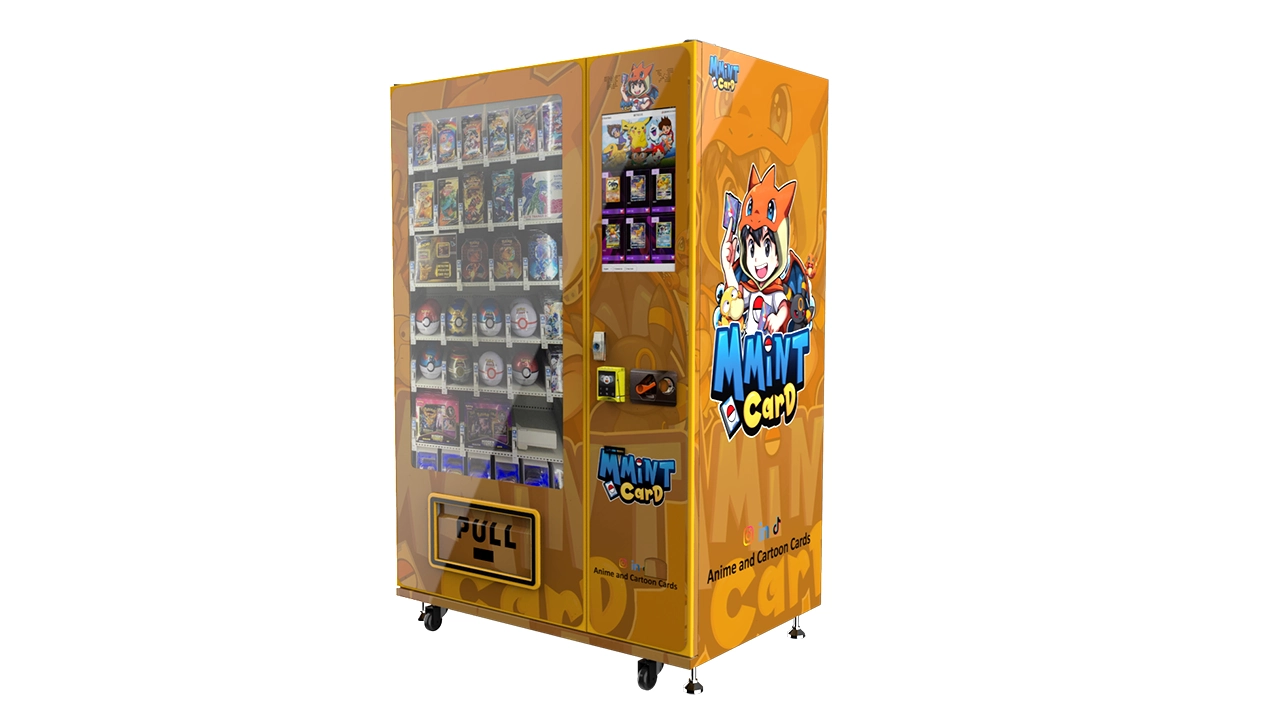
For most operators starting out, a flat-shelf or tray-based system is the best balance of cost, capacity, and reliability. It handles both booster packs and individual cards, and it’s easier to restock than a robotic arm. The 32-inch touchscreen models are great for customer engagement because they can display card images and pricing dynamically, but they require more technical upkeep. If you’re not comfortable with basic troubleshooting, stick with simpler hardware.
I’ve also seen hybrid machines that combine vending with display cases for high-value singles. These are interesting because they let you sell a $200 Charizard card without worrying about theft. But they’re niche, and they don’t move volume. If you’re just starting out, focus on volume with sealed product and mid-tier singles.
Supplier Selection: How to Avoid Getting Burned
Choosing the right equipment supplier is just as important as choosing the machine itself. I’ve seen operators buy from overseas manufacturers without doing their due diligence, only to wait months for spare parts or deal with poor customer support. My advice: look for a supplier with a track record in automated retail and a local service network, or at least one that offers remote diagnostics and fast shipping for replacement parts.
One name that comes up often in my circles is Zhongda Smart. They’re a manufacturer that produces a range of self-service kiosks, including card vending machines. I’ve inspected a few of their units at trade shows, and the build quality is solid for the price. They offer customization options like screen size, shelving configurations, and payment integrations. I can’t say they’re the absolute best for every scenario, but they’re a legitimate option worth considering if you’re looking for a balance between cost and features. Just make sure you ask about warranty terms, spare parts availability, and software updates before you commit.
When I vet a supplier, I ask for a list of current installations and I actually call a few operators. I want to know how long the machine has been running, what issues they’ve encountered, and how responsive the supplier was when something broke. That’s more valuable than any brochure.
Also, don’t ignore the payment system. In the U.S. and Europe, most customers expect to pay with credit cards, Apple Pay, or Google Pay. Cash-only machines are a non-starter in most locations. Make sure the machine you choose supports modern payment methods and that the transaction fees are reasonable. According to Statista, cashless payments accounted for over 60% of vending machine transactions in 2023, and that number keeps climbing. If your machine only takes coins and bills, you’re cutting off a huge chunk of potential revenue.
Inventory Management: The Real Key to Profitability
You can have the best TCG vending machine on the market, but if your inventory is stale, you won’t sell anything. Collectors want new releases, popular sets, and the occasional hidden gem. I learned this the hard way when I stocked a machine with too many older Yu-Gi-Oh sets that weren’t in demand. They sat there for months, tying up my capital and cluttering the shelves.
My approach now is to allocate about 60% of shelf space to sealed booster packs and boxes from current sets, 30% to single cards in protective cases, and 10% to accessories like sleeves, dice, and deck boxes. This mix gives customers variety while keeping the inventory fresh. I track sales data weekly and rotate out anything that hasn’t moved in 30 days.
Pricing is another factor. You’re not going to beat online retailers on every single card. But you can win on convenience and impulse purchases. A booster pack at $5.99 might cost $4.99 online, but the customer who’s standing in front of your machine is willing to pay a small premium for instant gratification. I price my sealed product at a 10–15% markup over retail and my singles at market value, with a slight bump for cards that are popular but hard to find locally.
Restocking frequency depends on location. A high-traffic game store might need restocking every two to three days, while a lower-traffic spot might only need a weekly visit. My rule is to restock before the machine is completely empty. An empty shelf looks broken, and it discourages repeat visits. I also rotate the front-facing products to make the machine look fresh, even if the inventory hasn’t changed much.
Failure Case: What I Learned from a Bad Placement
I want to share a failure story because it taught me more than any success. A few years ago, I placed a card vending machine in a family entertainment center. The location had high foot traffic, families with disposable income, and plenty of space. On paper, it looked perfect. But the machine barely sold $100 a week, and I was losing money on rent and inventory.
The problem was the audience. The entertainment center attracted families with young kids who wanted arcade games and pizza, not trading cards. The few collectors who came through were there for the games, not to browse a vending machine. I had misread the demographic. I pulled the machine after three months and moved it to a comic shop two miles away, where it started doing $500 a week in sales. Same machine, same inventory, completely different result.
That experience taught me to look beyond foot traffic. You need the right kind of foot traffic. If the people passing by aren’t collectors or don’t have a reason to buy cards, your machine is just a decorative box. I now spend more time researching the local community before I commit to a location. I check social media groups, visit local game stores, and even ask around at hobby events. It’s worth the extra effort.
Success Case: How a Small Investment Paid Off
On the flip side, I had a client who placed a wall-mounted card vending machine in a small hobby shop outside Portland. The shop was tiny, maybe 800 square feet, but it had a loyal customer base that came in weekly for game nights. The owner was skeptical at first, but he agreed to a revenue split. We stocked the machine with a mix of Pokemon boosters, MTG singles, and some Yu-Gi-Oh product.
Within the first month, the machine was doing $800 in sales. By the third month, it was generating over $1,200 a month, and the owner was restocking it himself because he saw the margin. The key was that the shop already had a community of collectors who trusted the owner’s judgment. The machine was an extension of that trust, not a replacement for it.
That’s the sweet spot. A card vending machine works best when it’s part of a larger ecosystem of hobby retail. It complements an existing business, adds revenue, and attracts customers who might not have walked in otherwise. If you can find a location like that, you’re golden.
Maintenance, Repairs, and the Cost of Downtime
Every machine breaks eventually. The question is how quickly you can fix it and how much it costs you in lost sales. I budget about 5% of monthly revenue for maintenance and repairs. That covers things like jammed dispensers, faulty card readers, and software glitches. If you’re not handy, you’ll need to build a relationship with a local vending machine repair technician or rely on your supplier’s service network.
Downtime is your worst enemy. A machine that’s out of order for a week can cost you $100 to $300 in lost sales, plus the damage to your reputation. I’ve learned to keep spare parts on hand, especially for common failure points like the card reader and the dispensing mechanism. If you’re using a 32-inch touchscreen model, make sure you have a backup touchscreen or a plan to swap it out quickly.
Remote monitoring is a lifesaver. Many modern machines come with telemetry that alerts you to low inventory, payment errors, or mechanical failures. I check my machines’ status remotely at least once a day. That way, I can address issues before they become major problems. If a machine isn’t reporting, I know something’s wrong and I send someone to check it.
Another tip: keep the machine clean. A dusty screen or a dirty glass panel makes the product look unappealing. I wipe down my machines every time I restock, and I schedule a deep clean once a month. It sounds simple, but it makes a difference in sales.
Payment Systems and the Cashless Experience
Modern customers expect to pay with their phones or cards. If your machine only takes cash, you’re leaving money on the table. I’ve seen machines that support cash, credit cards, and mobile wallets outperform cash-only machines by 40% or more. The transaction speed matters too. A machine that takes 30 seconds to process a payment will frustrate customers, especially if there’s a line.
I prefer machines with integrated payment systems that support multiple methods. Card readers should accept EMV chips and contactless payments. Some machines also support loyalty programs or promo codes, which can drive repeat business. If you’re placing a machine in Europe, make sure it supports local payment methods like iDEAL or SEPA direct debit, depending on the country. According to Eurostat, cashless payments are growing across the EU, and contactless is becoming the norm in many urban areas.
One thing to watch out for is transaction fees. Payment processors charge anywhere from 2% to 4% per transaction, plus a small fixed fee. On a $5 booster pack, that’s not a big deal. But on a $200 single card, it adds up. I negotiate with my payment processor to get the lowest possible rate, and I factor those fees into my pricing.
Self-Operated vs. Revenue Share vs. Full-Service
There are three main ways to run a card vending machine operation. You can own and operate everything yourself, you can place machines in partner locations with a revenue split, or you can hire a management company to handle the day-to-day. Each model has pros and cons.
Self-operation gives you full control and maximum profit, but it requires time and effort. You’re responsible for sourcing inventory, restocking, maintenance, and customer service. If you have a full-time job, this can be tough. I know operators who run five machines on the side, but they’ve streamlined their processes and have a reliable restock routine.
Revenue share is a good middle ground. You place the machine in a business and split the sales with the owner. You handle the machine and inventory, and they provide the space and foot traffic. I usually offer a 70/30 split in favor of the location owner, but that’s negotiable. The benefit is that you don’t pay rent, and the location owner has an incentive to promote the machine. The downside is that you’re giving up a chunk of your margin.
Full-service management is for investors who want a hands-off approach. You hire a company to handle everything, from machine placement to restocking. This is the most expensive option, and your profit margin shrinks significantly. I’ve seen management companies charge 30% to 50% of gross revenue. That might be worth it if you have multiple machines and no time, but it’s not the best way to maximize returns.
Legal Considerations and Permits
Before you install a card vending machine, check local regulations. In the U.S., vending machines are generally subject to sales tax, and you may need a vendor’s license or a business permit. Some municipalities require a special permit for vending machines, especially if they’re placed in public spaces. I always check with the local business licensing office before I commit to a location.
In the EU, the rules vary by country, but you’ll likely need to register your business and comply with consumer protection laws. If you’re selling collectible cards, you don’t need a special license, but you should be aware of any labeling requirements. According to the U.S. Small Business Administration, you should also consider liability insurance in case someone gets injured using your machine or if there’s a dispute over a transaction.
One more thing: if you’re placing a machine in a school or on public property, you’ll need to go through a formal approval process. That can take months, so factor that into your timeline.
FAQ: Answers to the Questions I Get Most Often
Are vending machines profitable?
They can be, but it’s not guaranteed. A well-placed card vending machine in a high-traffic hobby shop can generate $500 to $1,500 per month in sales, with a gross margin of 20% to 40% after product costs and fees. However, a poorly placed machine can lose money. I’ve seen both outcomes.
How much does a card vending machine cost?
New machines typically range from $8,000 to $20,000, depending on size and features. Wall-mounted units are cheaper, starting around $5,000. Used machines can be found for $3,000–$6,000, but be prepared for potential repair costs. My total startup budget for a single location is usually $12,000 to $30,000 including inventory.
How long does it take to recoup my investment?
Based on my experience, a successful location can pay back the machine cost in 12 to 24 months. That assumes consistent sales and manageable maintenance costs. If your location underperforms, the payback period stretches out, or you may never recoup your investment.
Should a beginner buy or lease a machine?
I generally recommend buying your first machine, even if it’s a used one. Leasing often comes with higher long-term costs and less flexibility. But if you’re unsure about the business and want to test the waters, a short-term lease with a management company might be a lower-risk way to start.
Where should I place my machine to maximize sales?
Look for locations with existing collector foot traffic: game stores, comic shops, hobby shops, and college campuses. You need at least 50 people passing by per hour and a demographic that’s interested in trading cards. Avoid locations where the audience is too young or too casual, like family entertainment centers, unless you have a specific reason to believe it will work.
What permits or licenses do I need?
You’ll likely need a business license and a vendor’s permit for sales tax collection. Check with your local municipality and state or provincial government. If you’re placing a machine in a partner location, make sure your contract covers liability and compliance.
How do I choose a reliable supplier?
Ask for references and call existing operators. Check the supplier’s warranty, spare parts availability, and response time for technical support. Look for manufacturers with a proven track record in automated retail, like Zhongda Smart, but verify their claims independently.
What if my machine breaks down?
Have a plan in place before it happens. Keep spare parts for common failures, have a local repair technician on call, and use remote monitoring to catch issues early. Budget about 5% of monthly revenue for maintenance and repairs.
How can I reduce restocking and maintenance costs?
Use sales data to optimize your inventory and avoid slow-moving products. Restock on a schedule that matches your sales velocity, and consolidate trips to multiple locations in the same area. Keep the machine clean and well-maintained to prevent breakdowns.
Final Thoughts on Building a Card Vending Machine Business
I’ve been in this industry long enough to know that there’s no single best TCG vending machine for everyone. The right equipment depends on your budget, your location, and the type of products you want to sell. But I can tell you this: the operators who succeed are the ones who treat the machine as a retail channel, not a novelty.
Start small, test your location, and be prepared to move the machine if it doesn’t perform. Track your sales data religiously and adjust your inventory based on what’s moving. Build relationships with location owners and suppliers. And above all, don’t expect to get rich overnight. A card vending machine can be a solid source of income, but it’s a business like any other. It takes work, patience, and a willingness to learn from your mistakes.
If you’re serious about this, I’d recommend reading more about trading card vending machine operations and specific 32-inch touchscreen models to understand the options. You might also want to check out cost breakdowns and ROI projections that I’ve seen work in the field. And if you’re thinking about a compact setup, a wall-mounted card vending machine might be your entry point.
There’s also a useful resource on placement strategies and location evaluation that aligns with what I’ve learned over the years. And if you want to see how different configurations perform, take a look at real-world case studies and operator interviews.
Disclaimer: The figures and insights in this article are based on my personal experience and publicly available data. Actual results vary depending on location, market conditions, and operational efficiency. This content is for informational purposes only and does not constitute financial or legal advice.